
Arrays: many values under one name
Arrays in MakeCode and Arduino programs: indexes from zero, a loop through an array, two-dimensional arrays, sizeof, memory and going past the end of an array.
A row of boxes
A variable is a little box with a name, in which the program keeps one piece of data. But what if the program has to remember lots of similar data: the scores of four players, the pins of four LEDs or the characters of all 16 keys of a keypad? Sixteen variables with almost the same names are hard to write and to read.
That’s why there are arrays: a row of boxes with one shared name. Each box has its own number, its index, and indexes start from zero:
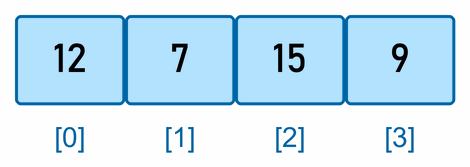
The array in the picture holds the scores of four players. The first player has index 0, and the last index 3, even though there are four players. It’s like the floors of a building: the ground floor is floor zero, so the fourth floor from the bottom is the third floor.
In one array, all the values are of the same kind: all numbers, or all characters.
How arrays are used on the micro:bit is in the section Arrays in MakeCode, and for the Arduino workshop there’s the section Arrays in an Arduino program.
Arrays in MakeCode
MakeCode calls an array an array too. The blocks for arrays are in the Arrays category, which opens when you click Advanced:
- set list to array of 1 2 3 makes an array called list and stores three numbers in it;
- list get value at 0 reads the first value in the array;
- length of array list says how many values are in the array.
Arrays in an Arduino program
From here on, the page is for the Arduino workshop.
How to make an array
We make an array like a variable, but after the name we write in square brackets how many values it has, and the values in curly brackets:
int score[4] = {12, 7, 15, 9};        // four numbers of type int
const int leds[] = {2, 3, 4, 5};      // the number may be left out: the compiler counts them itself
char letters[3] = {'A', 'B', 'C'};    // three characters
We get to a single value, an element of the array, by its index in square brackets:
Serial.println(score[0]);    // the first element: 12
Serial.println(score[3]);    // the last element: 9
score[2] = 20;               // the third element is now 20
A few rules:
- If you write fewer values than the array has elements, the others are 0:
int a[5] = {1, 2};is 1, 2, 0, 0, 0. - An array written above
setup()without values is full of zeros, likewasPressed[4][4]in the lesson Many switches on few pins. - The number of elements is fixed when you make the array. It can’t grow or shrink later.
- You can’t copy an array with
=(a = b;is an error), or compare two arrays with==. Copy or compare the elements one by one, in a loop.
A loop through an array
An array is most useful with a for loop: the same command runs for every element, and the index is the loop’s counter. This turns all the pins in the array leds into outputs:
const int leds[] = {2, 3, 4, 5};
const int LED_COUNT = 4;

void setup() {
  for (int i = 0; i < LED_COUNT; i++) {     // i goes from 0 to 3
    pinMode(leds[i], OUTPUT);
  }
}
The condition is i < LED_COUNT, not i <= LED_COUNT: the last index is one less than the number of elements.
You don’t have to write the number of elements yourself. sizeof says how many bytes something takes: the whole array of four ints takes 8 bytes, and one element 2. Divide them and you get the number of elements, which stays right when you add a value to the array or take one away:
const int LED_COUNT = sizeof(leds) / sizeof(leds[0]); // 8 / 2 = 4
Try it yourself: players’ scores
This program prints the scores of four players, their total and the winner. Upload it and open the Serial Monitor:
const int PLAYERS = 4;
int score[PLAYERS] = {12, 7, 15, 9};        // score[0] is the first player, score[3] the last

void setup() {
  Serial.begin(9600);

  int total = 0;
  int best = 0;                              // index of the player with the most points
  for (int i = 0; i < PLAYERS; i++) {        // i goes from 0 to 3
    Serial.print("Player ");
    Serial.print(i + 1);                     // people count from 1
    Serial.print(": ");
    Serial.println(score[i]);
    total = total + score[i];
    if (score[i] > score[best]) {
      best = i;
    }
  }

  Serial.print("Total: ");
  Serial.println(total);
  Serial.print("Winner: player ");
  Serial.println(best + 1);
}

void loop() {
}
The Serial Monitor shows:
Player 1: 12
Player 2: 7
Player 3: 15
Player 4: 9
Total: 43
Winner: player 3
The program remembers the index of the best player, not their score: from the index it knows both the score (score[best]) and which player it is. People count from 1, so the program adds 1 only when it prints.
Add a fifth player: change PLAYERS to 5 and add their score inside the curly brackets. The rest of the program stays the same, and that’s the whole point of an array.
A two-dimensional array
An array can also have rows and columns, like a table. Then it has two indexes: the first is the row, and the second the column. That’s how the lesson Many switches on few pins stores the characters of the 4 × 4 keypad:
const char keys[4][4] = {
  {'1', '2', '3', 'A'},
  {'4', '5', '6', 'B'},
  {'7', '8', '9', 'C'},
  {'*', '0', '#', 'D'}
};
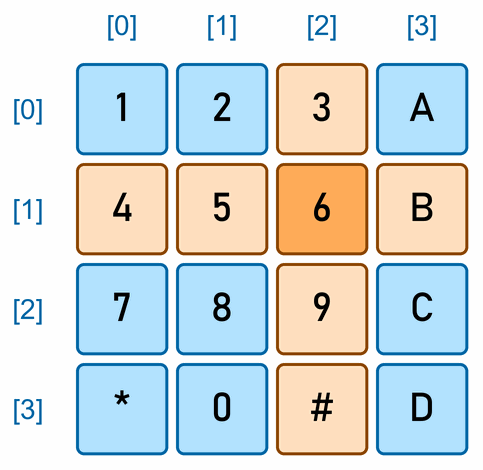
keys[1][2] is the character in row 1 and column 2, so '6'. We go through a two-dimensional array with a loop inside a loop: the outer one goes through the rows, and the inner one through the columns.Past the end of an array
In an array of four elements there are only the indexes 0 to 3. What happens with score[4]?
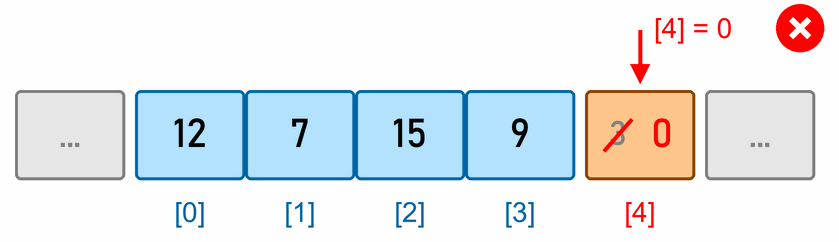
C++ doesn’t check whether an index is inside the array. The elements of an array sit next to each other in memory, and after the last one there’s usually some other variable. So score[4] reads whatever is in memory after the array, and score[4] = 0 writes 0 into that other variable.
No error message
The compiler doesn't report an error, and the program doesn't stop. Some other variable just quietly changes, so the program starts behaving strangely, while the cause is somewhere else entirely. The most common cause is the loop condition i <= 4 instead of i < 4.
When a program that uses arrays behaves strangely, check the loop conditions and the indexes first.
An array and a function
We can pass an array to a function, but the function doesn’t know how many elements the array has. So we pass it the number of elements as a second parameter:
int addUp(const int numbers[], int count) {
  int total = 0;
  for (int i = 0; i < count; i++) {
    total = total + numbers[i];
  }
  return total;
}
The call is addUp(score, PLAYERS). const says that the function only reads the array. Without const, the function could change the elements, and they would be the elements of the real array, not a copy of them.
Arrays and memory
The Arduino Uno has only 2 KB (2048 bytes) of memory for variables, and arrays fill it quickly: an array of 1000 ints takes 2000 bytes, leaving only 48 for everything else. So:
- Choose the smallest type that’s enough. For numbers from 0 to 255 a
byteis enough, and it takes half as much as anint. - Watch out for a large table that doesn’t change. On the Uno, even a table like that is in the memory for variables, unless you put it in the memory for the program with
PROGMEM(see the tips on the Arduino IDE page). - When compiling, the Arduino IDE prints how much memory the global variables take: Global variables use … bytes.
Text is an array of characters
Text is an array too: char name[] = "Ana"; is an array of the characters 'A', 'n' and 'a'. But this array has four elements, not three. At the end there's one more character, '\0', the number 0, which marks where the text ends. That's how Serial.println(name) knows when to stop.
We used arrays in the lesson Many switches on few pins, for the pins of the rows and columns, the characters of the keys and the state of each key. In the lesson Reaction game one of the challenges stores the fanfare’s frequencies in an array.
 What did we learn?
- An array is a row of variables with one name. Each has its own index, and indexes start from 0, so the last index is one less than the number of elements.
- In MakeCode, arrays are in the Arrays category, under Advanced. In an Arduino program we write an array with square brackets:
int score[4] = {12, 7, 15, 9};. - With a
forloop, the same command runs for every element of an array.sizeof(array) / sizeof(array[0])gives the number of elements. - A two-dimensional array has rows and columns:
keys[1][2]is row 1, column 2. - C++ doesn’t check the bounds of an array. An index outside the array quietly changes some other variable.
- Arrays quickly fill the Uno’s 2 KB of memory, so we choose the smallest type that’s enough for them.
Quick quiz
1. An array has six elements. What's the index of the first one, and of the last?
2. What is score[1] in the array int score[4] = {12, 7, 15, 9};?
3. What's wrong with the loop for (int i = 0; i <= 4; i++) for an array of four elements?
i = 4, and there’s no such element. The program then reads or changes the memory after the array. The right condition is i < 4.4. What's in the array int a[4] = {5};?
5. How many bytes does the array byte picture[8] take on the Uno, and the array long times[8]?
byte has one byte, so the first array takes 8 bytes. A long has four, so the second takes 32 bytes.6. Which character is keys[3][0] in the keypad table?
'*'. Row 3 is the last row ('*', '0', '#', 'D'), and column 0 the first character in it.7. Why do we pass a function the number of elements as well as the array?
8. How many elements does the array char name[] = "Ana"; have?
'\0' at the end, which marks the end of the text.