
Binary, octal and hexadecimal numbers
How a computer counts with zeros and ones: binary numbers on LEDs, bits, nibbles and bytes, octal and hexadecimal numbers, and writing them in code.
Only two states
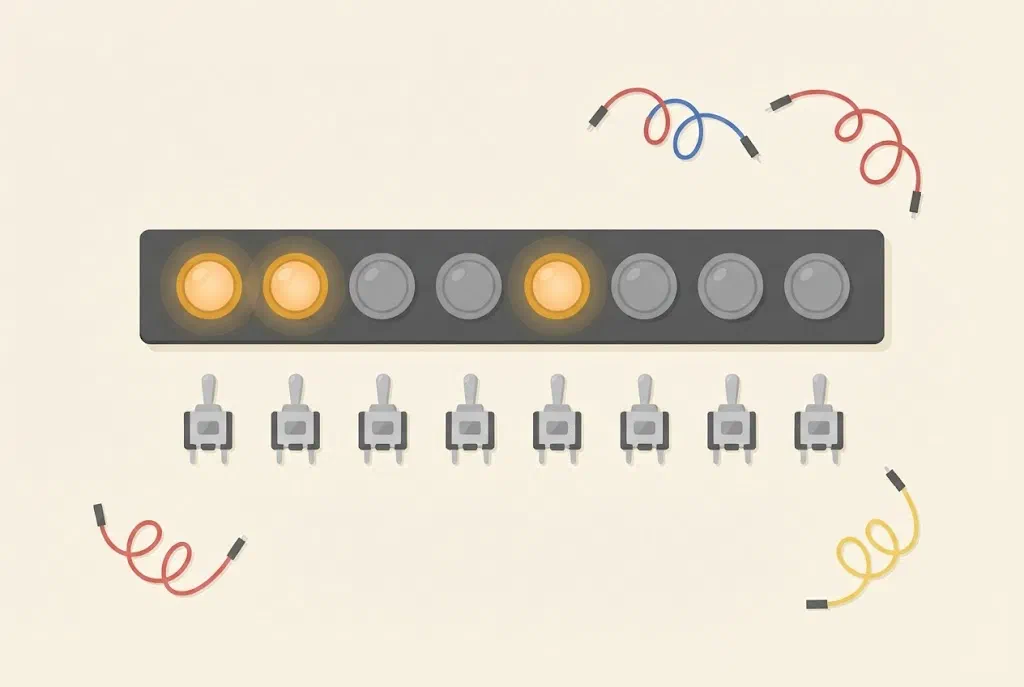
An LED can be on or off. A button is pressed or it isn’t. An Arduino pin is HIGH or LOW. Each time there are only two states, and we can write them as 1 and 0.
A computer, a micro:bit and an Arduino store and calculate everything using only zeros and ones: numbers, letters, pictures and sounds. Numbers written with only zeros and ones are called binary numbers.
How do you count with zeros and ones?
We count with ten digits, from 0 to 9. When we run out of digits, we start a new place: after 9 comes 10. Each place is worth ten times more than the one to its right: ones, tens, hundreds…
In binary there are only two digits, 0 and 1, so a new place starts already after 1. Each place is worth twice as much as the one to its right:

You get the number by adding up the values of the places that have a 1. The binary number 1101 is 8 + 4 + 1 = 13.
| Number | Binary | How it adds up |
|---|---|---|
| 0 | 0 | |
| 1 | 1 | 1 |
| 2 | 10 | 2 |
| 3 | 11 | 2 + 1 |
| 4 | 100 | 4 |
| 5 | 101 | 4 + 1 |
| 6 | 110 | 4 + 2 |
| 7 | 111 | 4 + 2 + 1 |
| 8 | 1000 | 8 |
Where are binary numbers used?
- In every computer and mobile phone. Pictures, songs, games and messages are stored as strings of bits. Every dot on the screen (pixel) has its own colour, and the colour is stored in a few bytes.
- In wires and radio links. Zeros and ones travel one after another through a USB cable, over Wi-Fi and over the micro:bit's radio. How this works is explained on the page How devices talk.
- QR codes. Every dark square is a 1 and every light one a 0. A QR code is a picture made of bits, which a phone reads with its camera.
- Braille. A character of the writing for blind people has six places for dots, and each dot is raised or not. That is six bits, so 64 different characters are possible.
- On an Arduino. When a program calls
pinMode()ordigitalWrite(), one bit changes inside the chip. Each pin has its own bit that says whether it is an input or an output, and its own bit that says whether it isHIGHorLOW.
Try it: numbers on cards
Make five cards. Draw 16 dots on the first, 8 on the second, then 4, 2 and 1. Lay them in a row, with 16 on the left.
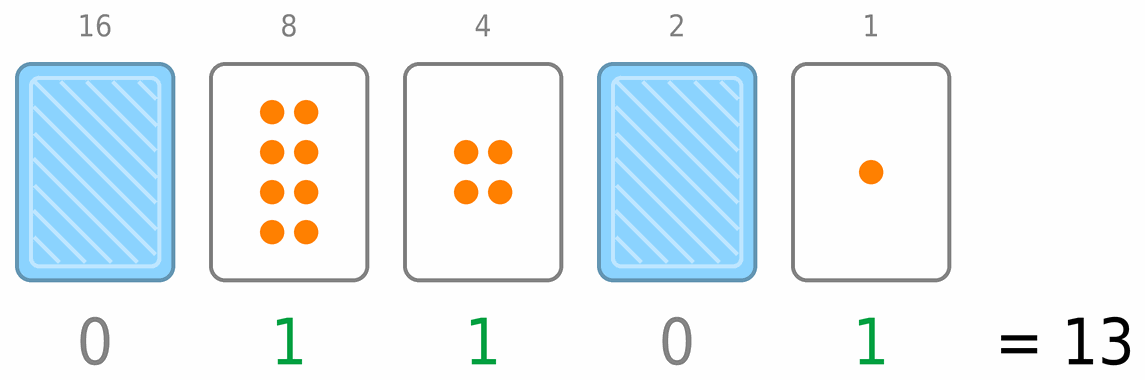
- A card with its dots facing up is 1, and one turned over is 0.
- The number is the sum of the dots on the cards you can see.
- Try to make 13: you turn over cards 8, 4 and 1, so it is written 01101.
- Make the number of your age. What is the largest number you can make with five cards?
You can do the same with five LEDs in one row of the micro:bit’s display: a lit LED is 1, and an unlit one 0. The whole micro:bit display has 25 LEDs, so it can show 25 zeros and ones at once.
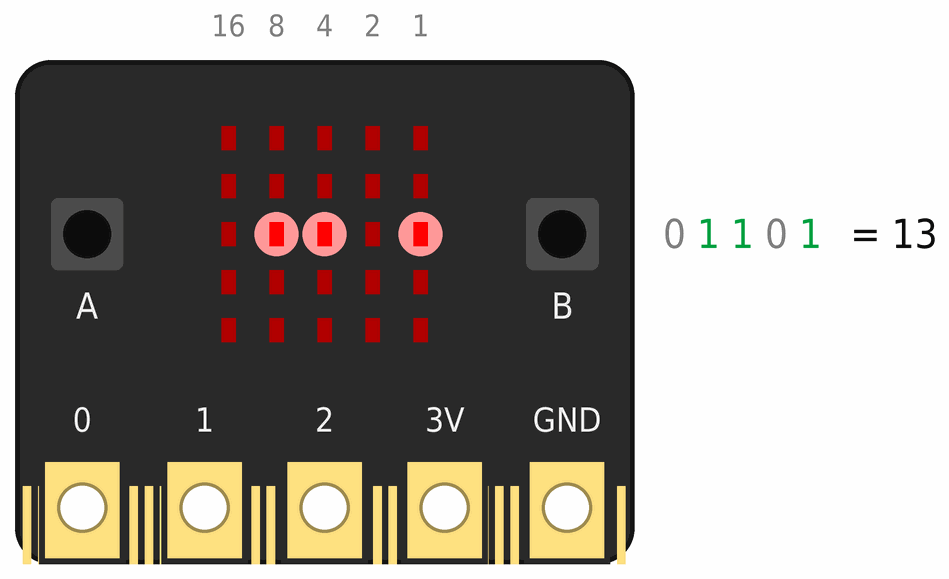
The largest number with five cards is 16 + 8 + 4 + 2 + 1 = 31. With six cards (you add 32) you can make numbers up to 63. Each new card doubles how many numbers you can make.
Bits, nibbles and bytes
One binary digit, one card or one LED, is called a bit. Eight bits together are called a byte. One byte can store the numbers from 0 to 255, because 128 + 64 + 32 + 16 + 8 + 4 + 2 + 1 = 255.
Four bits, half a byte, are called a nibble. One nibble can store the numbers from 0 to 15, because 8 + 4 + 2 + 1 = 15. A byte has two nibbles: the left four bits and the right four bits.
A bite and a nibble
The word byte sounds just like bite. When half a byte needed a name, someone thought of nibble, a small bite. People liked the name, and it stuck.
Memory is measured in bytes. An Arduino Uno has 2 kB (2048 bytes) of memory for variables. A mobile phone has millions of times more.
Octal and hexadecimal numbers
From here on, this page is for the Arduino workshop.
Number systems
A way of writing numbers is called a number system. The number of digits a system uses is called its base, and it tells you what each place is worth: each place is worth base times as much as the one to its right.
| System | Base | Digits | Place values | 200 in this system |
|---|---|---|---|---|
| decimal | 10 | 0 to 9 | … 1000, 100, 10, 1 | 200 |
| binary | 2 | 0 and 1 | … 128, 64, 32, 16, 8, 4, 2, 1 | 11001000 |
| octal | 8 | 0 to 7 | … 512, 64, 8, 1 | 310 |
| hexadecimal | 16 | 0 to 9 and A to F | … 4096, 256, 16, 1 | C8 |
The same number, 200, looks different in each system, but it is always the same number. Checking the octal one: 3 · 64 + 1 · 8 + 0 · 1 = 200. And the hexadecimal one: C is 12, so 12 · 16 + 8 = 200.
The first seventeen numbers in all four systems:
| Decimal | Binary | Octal | Hexadecimal |
|---|---|---|---|
| 0 | 0 | 0 | 0 |
| 1 | 1 | 1 | 1 |
| 2 | 10 | 2 | 2 |
| 3 | 11 | 3 | 3 |
| 4 | 100 | 4 | 4 |
| 5 | 101 | 5 | 5 |
| 6 | 110 | 6 | 6 |
| 7 | 111 | 7 | 7 |
| 8 | 1000 | 10 | 8 |
| 9 | 1001 | 11 | 9 |
| 10 | 1010 | 12 | A |
| 11 | 1011 | 13 | B |
| 12 | 1100 | 14 | C |
| 13 | 1101 | 15 | D |
| 14 | 1110 | 16 | E |
| 15 | 1111 | 17 | F |
| 16 | 10000 | 20 | 10 |
Why do programmers use octal and hexadecimal numbers at all? Because you can turn binary into them without any arithmetic: you just split the bits into groups.
Hexadecimal numbers
The hexadecimal system has 16 digits: 0 to 9 and A to F (A is 10, B is 11, and so on up to F, which is 15). One hexadecimal digit is exactly four bits, one nibble. So a byte is always two hexadecimal digits, one for each nibble.
Converting is simple: split the binary number into nibbles, starting from the right, and replace each nibble with one digit from the table above. The number 200 is 1100 1000 in binary: the nibble 1100 is C and the nibble 1000 is 8, so it is C8.
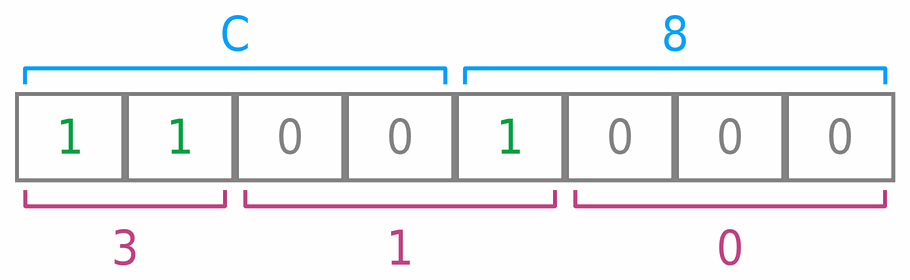
A long string of zeros and ones is easy to misread, and two hexadecimal digits are not. That is why hexadecimal is the way programmers most often write bytes.
Where are hexadecimal numbers used?
- Colours on the web. The orange of this website is
#ff8000. Each colour is one byte: redff(255), green80(128) and blue00(0). - Device addresses on an I2C connection. The chip that drives the Maqueen's motors has the address
0x10(see the page How devices talk). - Network addresses. Every device on a network, from a mobile phone to a Wi-Fi module, has its own MAC address of six bytes, written as twelve hexadecimal digits, for example
3C:71:BF:4A:12:9E. - Letters in Unicode. Every letter of every language in the world has its own number, written in hexadecimal: the Croatian letter Č is
U+010Cand Ž isU+017D. - The contents of files. Programs that show the bytes of a file show them in hexadecimal. Every PNG picture on this website starts with the bytes
89 50 4E 47, and the last three of them are the letters P, N and G. - Memory addresses. When a program on a computer crashes, the error message often shows the hexadecimal address of the place in memory where it happened.
Octal numbers
The octal system has eight digits, from 0 to 7. One octal digit is exactly three bits, so binary is turned into octal in groups of three bits, starting from the right. The number 200 is 11 001 000 in binary, which is 3, 1 and 0: 310 in octal (see the picture above).
A byte of eight bits doesn’t split neatly into groups of three, so octal numbers are rarely used today. In the C++ language they hide in one trap, described in the next section.
Where are octal numbers used?
- File permissions on Linux and the Mac. The command
chmod 755says who may do what with a file. The first digit is for the owner, the second for the owner's group and the third for everyone else. Each digit is three bits: read (4), write (2) and run (1). So 7 = 4 + 2 + 1 means everything, and 5 = 4 + 1 means read and run, but not write. - Transponders in aircraft. Every aircraft sends air traffic control a code of four digits from 0 to 7, which the pilot sets on the device. There are 8 · 8 · 8 · 8 = 4096 such codes. Some are special: 7700 means an emergency, and 7600 that the radio isn't working.
- Old computers. Computers from the 1960s, such as the PDP-8, worked with 12 bits at a time. Twelve bits split into four groups of three, so programmers wrote those numbers in octal.
Numbers in an Arduino program
Writing numbers in code
In a C++ program, what is written in front of a number decides its system:
byte a = 200;          // decimal
byte b = 0b11001000;   // binary: 0b in front
byte c = 0310;         // octal: 0 in front
byte d = 0xC8;         // hexadecimal: 0x in front
All four variables have the same value, 200. In older Arduino examples you will also see the binary form B11001000. That only works in Arduino, so it is better to use 0b.
A zero at the start of a number
C++ reads a number that starts with a zero as octal. So 010 in a program is eight, not ten. If you write a time or a pin with a leading zero to line things up, like 07 or 09, you get the wrong number or an error: 09 doesn't compile, because 9 is not an octal digit. So never put a zero in front of a decimal number.
Printing in the serial monitor
A program can print a number in any of these systems. This program prints the numbers from 0 to 16 in all four systems in the serial monitor, like the table above:
void setup() {
  Serial.begin(9600);
  Serial.println("DEC\tBIN\tOCT\tHEX");
  for (byte n = 0; n <= 16; n++) {
    Serial.print(n);           // decimal
    Serial.print('\t');        // tab: space up to the next column
    Serial.print(n, BIN);      // binary
    Serial.print('\t');
    Serial.print(n, OCT);      // octal
    Serial.print('\t');
    Serial.println(n, HEX);    // hexadecimal
  }
}

void loop() {
}
The output doesn’t start with zeros: 5 is printed as 101, not as 00000101.
A picture made of bits
An 8 × 8 LED matrix has eight rows, with eight LEDs in each row. So one row is exactly one byte: each bit says whether one LED is on. The whole picture is eight bytes:
byte smiley[8] = {
  0b00111100,
  0b01000010,
  0b10100101,
  0b10000001,
  0b10100101,
  0b10011001,
  0b01000010,
  0b00111100
};
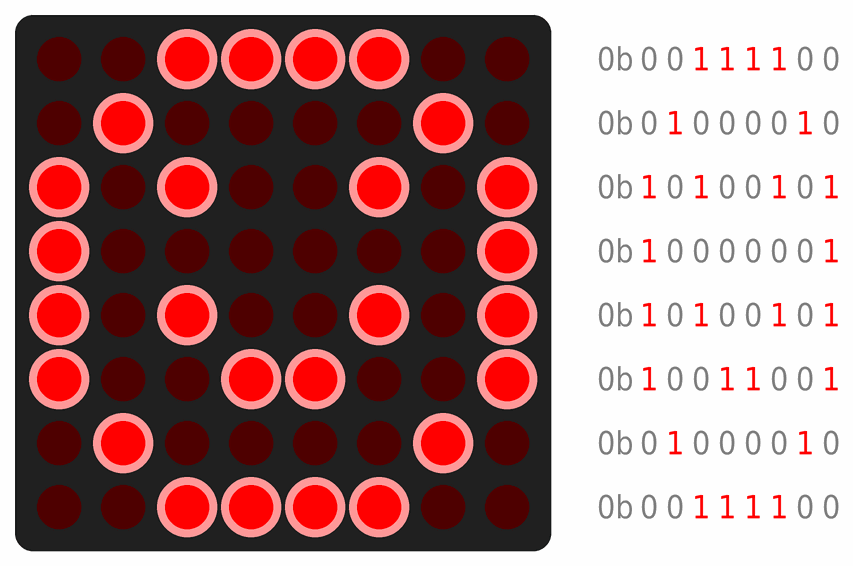
0b00111100, is 0x3C.The function bitRead(number, place) reads one bit of a number. Places are counted from 0, from the right: bitRead(0b00000100, 2) gives 1.
How many bits does a variable have?
Each type of variable has a fixed number of bits, and so a largest number it can store:
| Type | Bits | Range on an Arduino Uno | Largest number in hexadecimal |
|---|---|---|---|
byte | 8 | 0 to 255 | 0xFF |
int | 16 | −32,768 to 32,767 | 0x7FFF |
unsigned long | 32 | 0 to 4,294,967,295 | 0xFFFFFFFF |
In hexadecimal you can see at once how many bits a number has: each F is four ones.
When a number goes past the largest value, it starts again from the beginning, like the mileage counter in an old car: a byte holding 255 holds 0 after + 1. That is why we store the time from millis() in an unsigned long (see the lesson Two traffic lights at a crossroads).
analogRead() returns a number from 0 to 1023 because of bits too: the converter in the Arduino has 10 bits, and 10 bits can store 1024 different numbers.
 What did we learn?
- Binary numbers have only two digits, 0 and 1. Each place is worth twice as much as the one to its right: 1, 2, 4, 8, 16…
- One binary digit is a bit, four bits are a nibble, and eight bits are a byte, which stores the numbers from 0 to 255.
- The octal system has the digits 0 to 7, each of them three bits. The hexadecimal system has the digits 0 to F, each of them four bits, one nibble, so a byte is always two hexadecimal digits.
- In an Arduino program we write a binary number with
0b, a hexadecimal one with0x, and an octal one with a zero at the start. That is why we never put a zero in front of a decimal number. - Each variable has a fixed number of bits. When a number goes past the largest value, it starts again from the beginning.
Short quiz
1. Which number is written in binary as 1010?
2. How do you write the number 6 in binary?
3. How many different numbers can you make with five cards (starting from 0)?
4. How many bits does a nibble have, and how many nibbles are in a byte?
5. Write the binary number 1111 0011 in hexadecimal.
0xF3 in code).6. What is 0x1F in decimal?
7. A program says int a = 010;. What is a?
8. A variable of type byte has the value 255. What does it have after you add 1?
9. Why does analogRead() return numbers from 0 to 1023?