
Buzzer and speaker
Active and passive buzzers and speakers: telling them apart, tone() on an Arduino, playing a melody, and why a speaker needs a transistor or an amplifier.
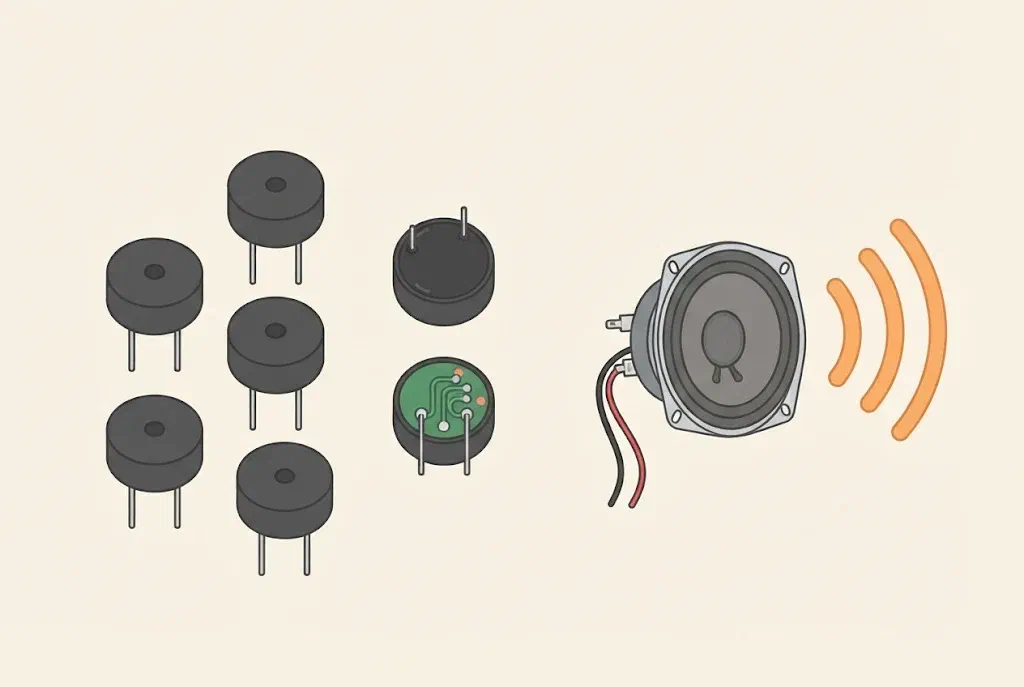
How is sound made?
Sound is the air vibrating. When a thin plate moves back and forth quickly, it pushes the air, and the air’s vibrations reach our ears. The faster the plate vibrates, the higher the note. The number of vibrations in one second is called the frequency, and it is measured in hertz (Hz). A note of 440 Hz means 440 vibrations a second. The human ear hears roughly from 20 Hz to 20,000 Hz.
A buzzer and a speaker turn an electric current into such vibrations:
- A buzzer is small, loud and simple. It is good for short sounds: a beep, a warning, a simple tune.
- A speaker is bigger and can play music and speech, but it needs much more current.
Active and passive buzzers
Buzzers look almost the same but work differently. This is the most common mix-up with them:
- An active buzzer has a small circuit inside that makes the note by itself. When it gets a voltage, it buzzes, always with the same note.
- A passive buzzer doesn’t have that circuit. With a steady voltage it only clicks once. To play, the voltage must be switched on and off very quickly, which an Arduino, for example, can do. That is why it can play any note and any tune.
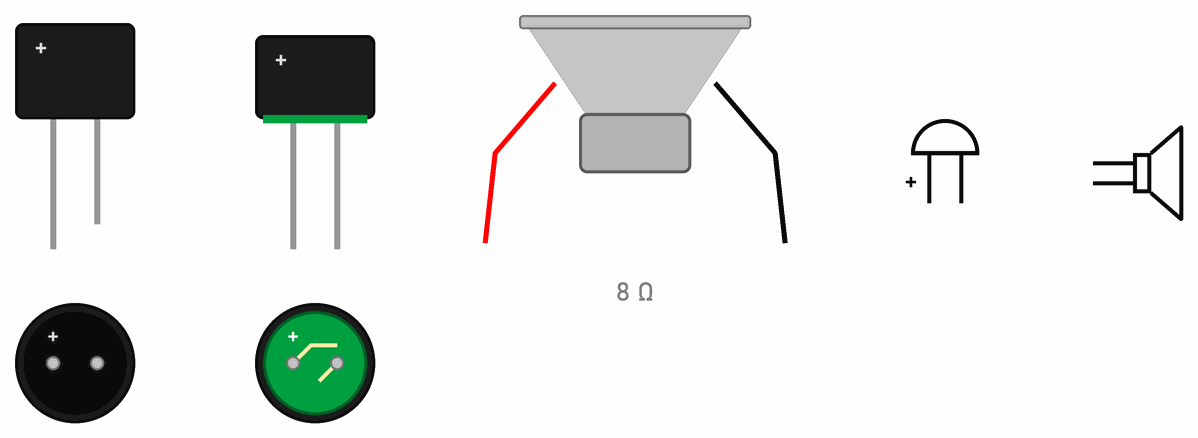
How to tell them apart:
- From below: an active buzzer is sealed with black resin, and on a passive one you can see a green circuit board.
- Height: an active buzzer is usually a little taller.
- With a multimeter: set to resistance, a passive buzzer shows a small resistance, from about ten to a few tens of ohms, because there is only a coil inside. An active one shows a much higher or unsteady number, because there is a circuit inside.
Both have a plus and a minus. The + leg is longer, and a + sign is also on top of the case.
On the symbol a buzzer is a half circle on a line, and a speaker is a small rectangle with a funnel.
What is inside a buzzer?
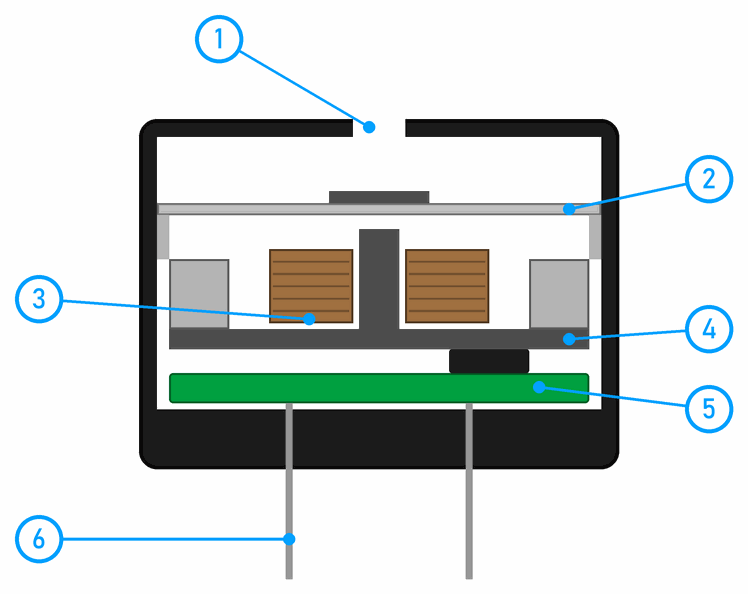
- The hole the sound comes out of.
- The metal membrane: a thin round plate with an iron disc in the middle. This is what vibrates.
- The coil: thin copper wire wound round an iron core. When current flows through it, it becomes an electromagnet and pulls the membrane.
- The ring-shaped magnet the membrane rests on. It always pulls the membrane a little, so it vibrates more strongly.
- The circuit that switches the current through the coil on and off. Only an active buzzer has it.
- The legs.
When current flows, the coil pulls the membrane. When the current stops, the membrane springs back. If that happens 2000 times a second, the membrane vibrates 2000 times a second and we hear a note of 2000 Hz. There are also piezo buzzers, which have no coil: a thin ceramic plate bends by itself when it gets a voltage.
A speaker works in a similar way, only everything is bigger: the coil is glued to a paper or plastic cone and sits in the gap of a strong magnet. A bigger cone pushes more air, so the sound is louder and fuller.
Where we use them
- At the micro:bit workshop, sounds are played by the blocks in the Music category. The micro:bit V2 has a built-in speaker, and the Maqueen robot has its own buzzer as well.
- At the Arduino workshop an active buzzer tells pedestrians they have green in Traffic lights for cars and pedestrians, and makes the sounds of the Reaction game.
- In the SoundLab project the Arduino makes the sound, and an LM386 amplifier drives the speaker. The pinball machine plays through speakers with a DFPlayer module.
Buzzers are loud
Don't hold a buzzer against your ear. When many buzzers sound at once in a classroom, stick a small piece of tape over the hole, and while you change the program, pull its wire out of the pin.
Buzzers and speakers at the Arduino workshop
From here on, this page is for the Arduino workshop.
The tone() command
tone(pin, frequency) switches the pin on and off the given number of times a second, until noTone(pin) stops it. tone(pin, frequency, duration) stops by itself after the given number of milliseconds. The graph shows the voltage on pin D8 at 440 Hz and at 880 Hz:
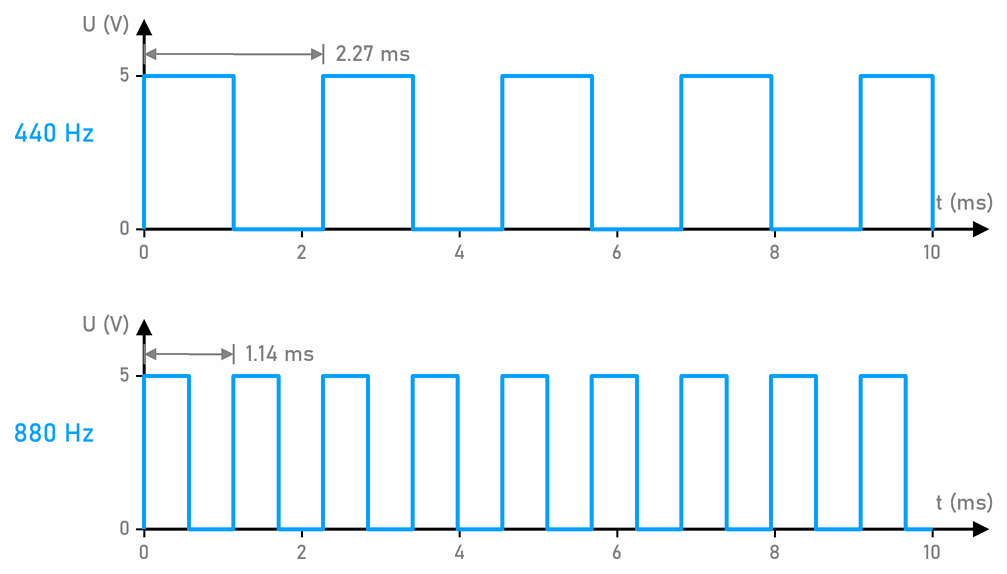
HIGH, and for half LOW. A note of 880 Hz vibrates twice as fast and sounds an octave higher.What else to know about tone():
tone()only starts the sound and doesn’t wait for it to finish. If you call anothertone()before the first one ends, the new one replaces the old one, as in the Reaction game. The Arduino Uno plays only one note at a time.- On the Uno,
tone()uses the timer Timer2, so while a sound plays,analogWrite()doesn’t work on pins 3 and 11.
The sound of phone keys
When you press a key on a phone, you hear a short sound. That is tone dialling (DTMF): each key plays two notes at once, one for its row and one for its column on the keypad. The telephone exchange tells from the two notes which key you pressed. Two notes are used instead of one so that speech or music on the line can't dial a number by accident.
| 1209 Hz | 1336 Hz | 1477 Hz | |
|---|---|---|---|
| 697 Hz | 1 | 2 | 3 |
| 770 Hz | 4 | 5 | 6 |
| 852 Hz | 7 | 8 | 9 |
| 941 Hz | * | 0 | # |
Key 5, for example, plays 770 Hz and 1336 Hz at the same time. There is also a fourth column, 1633 Hz, for keys A, B, C and D, which ordinary phones don't have. The same notes still travel down the line when a recorded message says for information, press 1. An Arduino Uno plays only one note at a time with tone(), so it can't play the sound of a phone key.
An active buzzer and tone()
An active buzzer buzzes with its own note. When tone() switches it on and off, we hear a mix of its note and the note we asked for. That is why the sounds are rough, as on the pedestrian traffic light. For real notes and tunes you need a passive buzzer.
A program: a melody
Connect a passive buzzer to D8 through a 150 Ω resistor, and its other leg to GND. Its coil has a small resistance, so without the resistor the pin wouldn’t survive. With 150 Ω the current is at most 5 V / 150 Ω ≈ 33 mA, whatever the coil’s resistance. That is below the 40 mA a pin may give at most, and because the pin is LOW half the time, on average only half of it flows.
// C++
const int buzzer = 8;                  // passive buzzer (or a speaker through a transistor)

// Ode to Joy: the pitch of each note (Hz) and how long it lasts (ms)
const int notes[] = {330, 330, 349, 392, 392, 349, 330, 294,
                     262, 262, 294, 330, 330, 294, 294};
const int lengths[] = {400, 400, 400, 400, 400, 400, 400, 400,
                       400, 400, 400, 400, 600, 200, 800};
const int NOTE_COUNT = sizeof(notes) / sizeof(notes[0]);

void setup() {
  pinMode(buzzer, OUTPUT);
}

void loop() {
  for (int i = 0; i < NOTE_COUNT; i++) {
    tone(buzzer, notes[i], lengths[i] * 9 / 10);  // the note is a little shorter, so notes don't run together
    delay(lengths[i]);                            // tone() doesn't wait, so we do
  }
  delay(2000);                         // a pause before playing it again
}
The notes are in the array notes, and their lengths in the array lengths, in the same places. The for loop plays them one by one. Each note sounds for 90 % of its time, so a short silence is left between two equal notes and we hear them apart. The notes are E, E, F, G, G, F, E, D, C, C, D, E, E, D, D: the beginning of Ode to Joy.
Notes and frequencies
Every note of the scale has its own frequency. The note A, which musicians tune their instruments to, is exactly 440 Hz. The table shows the notes of C major in three octaves, rounded to whole hertz, as tone() wants them. The numbers are in hertz.
| C | D | E | F | G | A | B | C | |
|---|---|---|---|---|---|---|---|---|
| octave below | 131 | 147 | 165 | 175 | 196 | 220 | 247 | 262 |
| middle octave | 262 | 294 | 330 | 349 | 392 | 440 | 494 | 523 |
| octave above | 523 | 587 | 659 | 698 | 784 | 880 | 988 | 1047 |
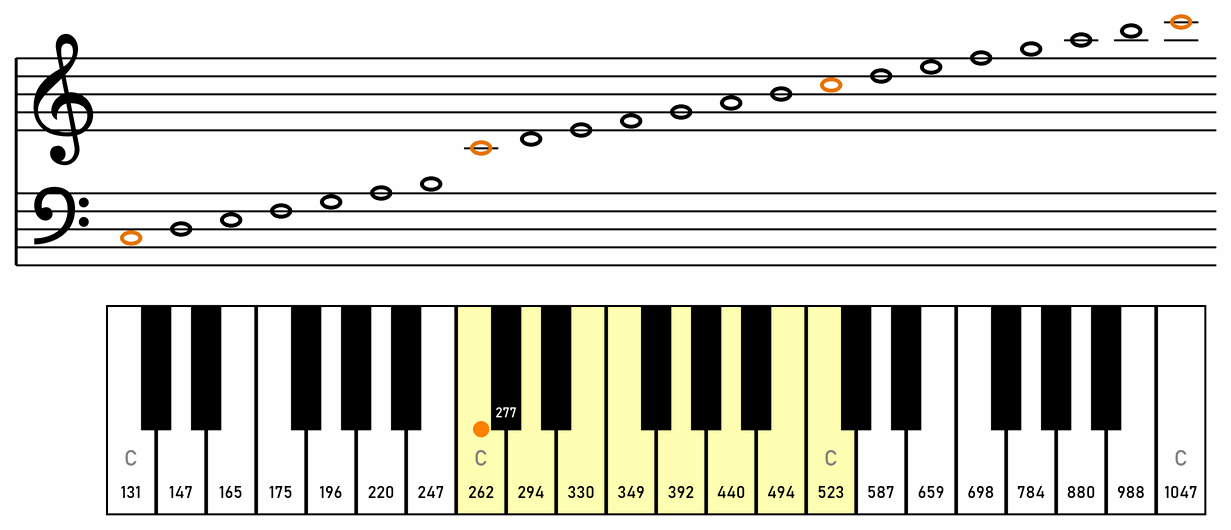
In the drawing, above each white key is its note on the staff, with the treble clef above and the bass clef below. The first C of the middle octave, 262 Hz, is middle C, roughly in the middle of a piano. Look at the notes A: 220, 440 and 880 Hz. A note an octave higher has twice the frequency, and a note an octave lower half of it. Between some notes there are also semitones, the black keys on a piano, such as C sharp (277 Hz) between C and D. Each semitone step raises the frequency by about 6 %.
The program in this section plays notes of the middle octave: 262 is C, 294 D, 330 E, 349 F and 392 G.
A speaker needs a transistor or an amplifier
A small speaker has a resistance of 8 Ω. Straight on a pin it would draw 5 V / 8 Ω ≈ 625 mA, about thirty times what a pin may give (misconception 25). So a transistor switches the speaker:
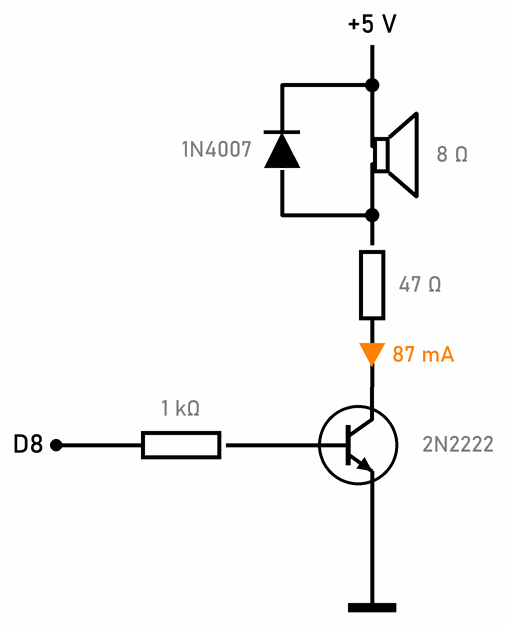
- The pin gives only 4.3 mA into the base, and 87 mA flows through the speaker from the 5 V supply.
- The 47 Ω resistor limits the current. Without it 600 mA would flow through the speaker and it would get about 1.4 W, too much for a small 0.5 W speaker. With it the speaker gets 0.03 W and the resistor 0.18 W, which a 0.25 W resistor can take.
- The diode is there because the speaker is a coil. When the transistor switches the current off, the coil makes a high voltage for a moment, and the diode kills it. Why is explained on the Diode page.
The transistor only switches the speaker on and off, so the sound has the same sharp shape as the signal in the graph above. For music and speech you need an amplifier, which also amplifies gentle changes in voltage. The LM386 in the SoundLab project is one. The DFPlayer module, which plays MP3 files from a memory card, has an amplifier built in, so a small speaker connects straight to it.
 What did we learn?
- Sound is the air vibrating. The frequency in hertz says how many vibrations there are in a second: a higher frequency is a higher note.
- An active buzzer buzzes one note by itself. A passive one needs a signal that switches on and off, and in return it plays any note.
- You recognise an active buzzer by the black resin underneath, and a passive one by its green circuit board.
tone(pin, frequency, duration)doesn’t wait for the sound to finish, and the Uno plays one note at a time.- A speaker doesn’t go straight on a pin, but through a transistor or an amplifier.
Quick quiz
1. How many times a second does a membrane playing a 1000 Hz note vibrate?
2. A buzzer is on a pin through a 150 Ω resistor. When you set the pin HIGH, the buzzer only clicks. What kind is it?
tone().3. How do you tell buzzers apart without a program?
4. How long does one vibration of a 500 Hz note last, and for how much of it is the pin HIGH?
HIGH for 1 ms and LOW for 1 ms.5. A program calls tone(8, 400, 100) and straight after it tone(8, 800, 100). What do we hear?
tone() doesn’t wait for the first sound to finish, so the second call replaces it at once. A delay(100) is needed between them.6. Why don't we connect an 8 Ω speaker straight to an Arduino pin?