
Infrared sensors
Infrared light, line sensors with an LED and a phototransistor, TV remotes and 38 kHz receivers, why sunlight confuses them, and an Arduino program.
What is infrared light?
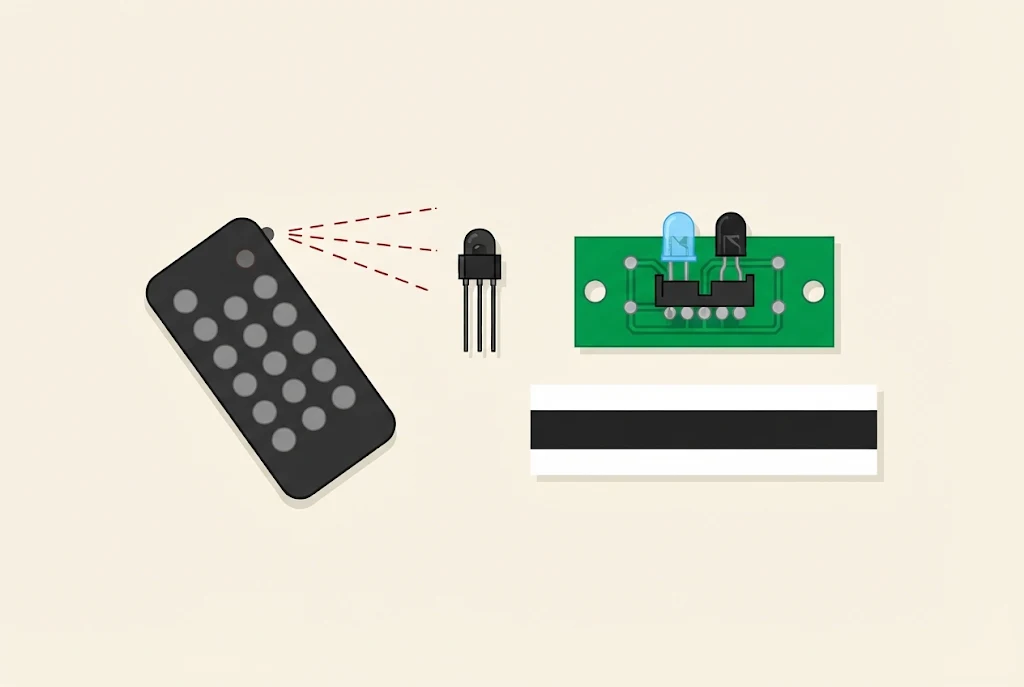
Infrared light is light our eyes can’t see. If we could see it, it would come right after red in a rainbow. Its name comes from its frequency, which is lower than red light’s: infra means below. We feel it as warmth, standing next to a stove or in the sun.
It is handy for sensors because we can’t see it: a lamp can shine all the time without bothering anyone. A phone camera can see some of it. Point a TV remote at a phone camera and press a button: on the screen you will see the LED at the tip of the remote flicker.
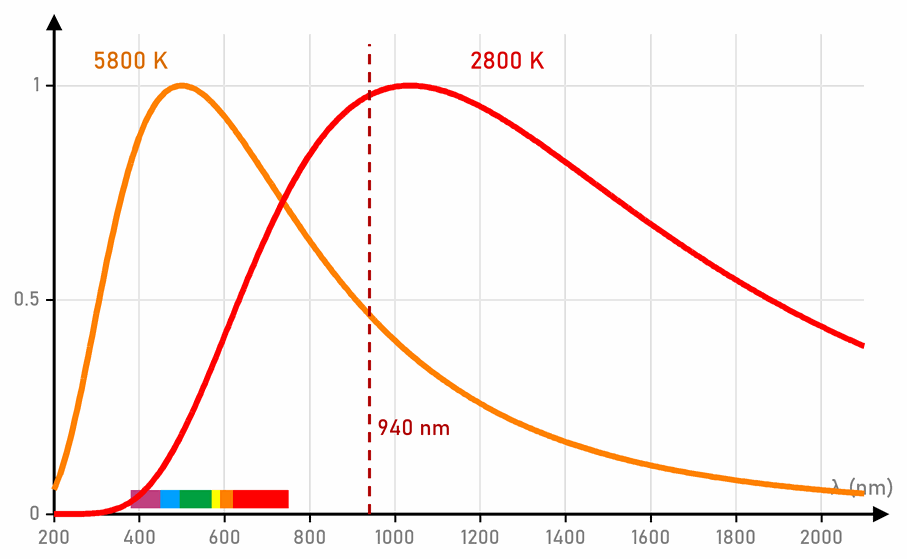
Light has a wavelength, measured in nanometres (nm). Our eyes see from about 380 nm (violet) to 750 nm (red). The infrared LEDs in sensors and remote controls shine at 850 or 940 nm.
The line sensor
A line sensor has two parts side by side: an infrared LED, which shines at the floor, and a phototransistor, which watches how much light comes back.
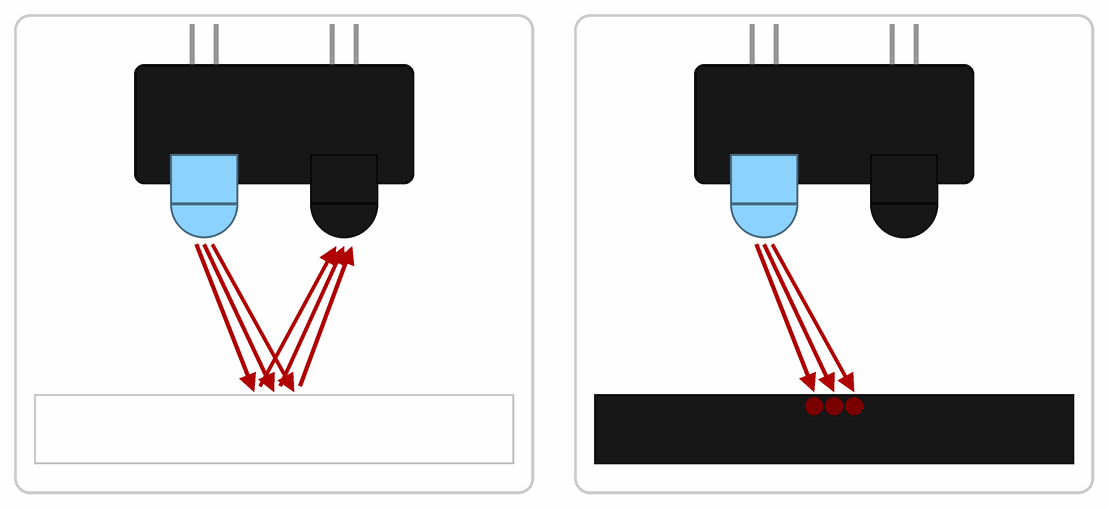
- White paper reflects a lot of light, so the phototransistor gets light.
- Black tape swallows the light, so almost nothing comes back.
A phototransistor is a transistor that is turned on by light instead of a current into its base. The more light falls on it, the more current it lets through.
The Maqueen robot has two such sensors underneath, a left one and a right one. It follows a black line with them in the lesson Line sensors.
Why does sunlight confuse them?
The sun gives off not only the light we see, but also a lot of infrared. When the sun shines on the track, the phototransistor gets infrared light even over the black tape, so it thinks there is white underneath. Shiny black tape also reflects light like white paper. That is why the robot’s track isn’t next to a window, and the tape is matt.
Remote control and receiver
A TV remote has an infrared LED. When you press a button, the LED sends a message: a row of short flashes. So that the sun and the room’s lamps don’t confuse the receiver, the LED flickers 38,000 times a second (38 kHz) during each flash.
An IR receiver is a small black part with three legs and a dome. Inside are a photodiode and a circuit that lets through only light that flickers 38,000 times a second. The sun and lamps don’t flicker like that, so the receiver hardly notices them. The Maqueen robot has such a receiver too.
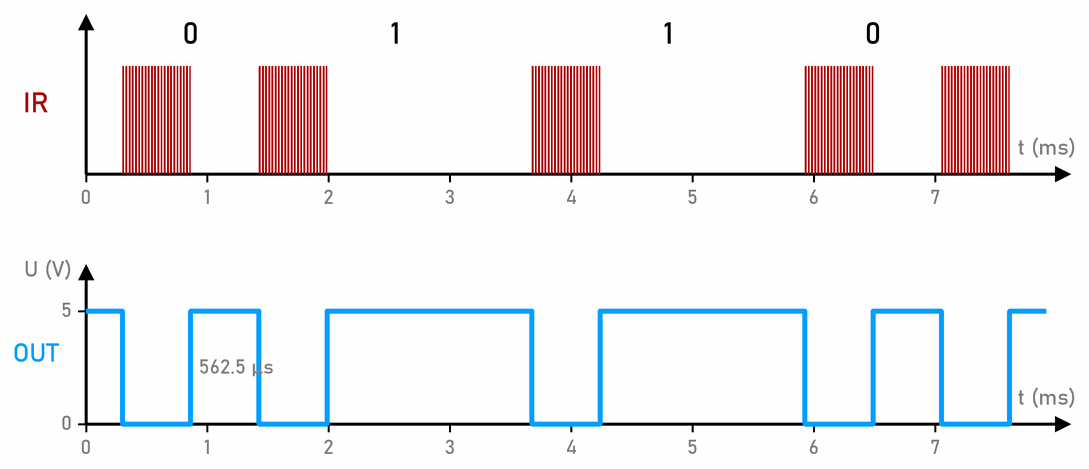
The top row shows what the remote’s LED does, and the bottom row what the receiver gives on its OUT pin: during each burst of flashes the output drops to 0 V. The bursts are all the same length, and the gaps between them carry the message: a short gap is 0, and a long one 1.
The break-beam
An infrared LED and a receiver can also face each other, on two sides of a lane. The LED shines at the receiver all the time, and when something passes between them, the beam is broken. That is a break-beam: there are some in lift doors and on garage doors, which don’t close while someone is in the way. In Detecting the ball a break-beam is one of the ways to detect the ball without touching it. Unlike a photoresistor, which is slow, infrared sensors react in less than a millisecond.
Infrared sensors at the Arduino workshop
From here on, this page is for the Arduino workshop.
A line sensor on an Arduino
A line sensor (for example a TCRT5000) is wired like this:
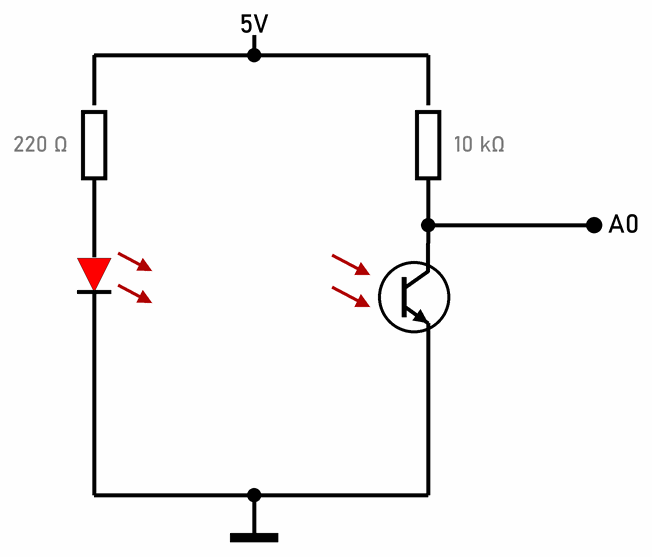
- The LED shines all the time, through a 220 Ω resistor. An infrared LED has about 1.2 V across it, less than a red one, so the current is (5 V − 1.2 V) / 220 Ω ≈ 17 mA.
- The phototransistor is in a voltage divider with a 10 kΩ resistor, like a photoresistor. When light comes back, the phototransistor lets current through and the voltage on A0 drops. Over white
analogRead(A0)gives a small number, and over black a big one, close to 1023.
Before writing the program, always measure what the sensor gives over white and over black, and put the limit between them. The sensor works best a few millimetres above the surface. The further away it is, the smaller the difference between white and black.
Ready-made modules also have an LM393 chip next to the sensor, which compares the voltage with a limit set by a small potentiometer. Such a module has a digital output DO (0 or 1), and often an analog AO too. The line sensors on the Maqueen robot also report only 0 or 1.
A trick against the sun
Connect the sensor's LED through its resistor to an Arduino pin instead of 5V. The program then measures A0 twice: once with the LED off, when the phototransistor sees only the room's light, and once with it on. The difference between the two readings is only the light reflected by the surface, and the light from the sun and the lamps cancels out.
A remote control on an Arduino
An IR receiver (for example a VS1838B) has three legs: OUT, GND and VCC. The order isn’t the same on all receivers and modules, so check it on the markings before wiring. Connect VCC to 5V, GND to GND and OUT to D2.
The IRremote library reads the messages. Install it in the Arduino IDE, in the Library Manager, like Bounce2 in the lesson on buttons:
// C++
#include <IRremote.hpp>                // the IRremote library, version 4

const int receiver = 2;                // the IR receiver's OUT pin

void setup() {
  Serial.begin(9600);
  IrReceiver.begin(receiver);          // start listening
}

void loop() {
  if (IrReceiver.decode()) {           // a whole message has arrived
    if (IrReceiver.decodedIRData.flags & IRDATA_FLAGS_IS_REPEAT) {
      Serial.println("button held");
    } else {
      Serial.print("Protocol: ");
      Serial.print(getProtocolString(IrReceiver.decodedIRData.protocol));
      Serial.print(", address: 0x");
      Serial.print(IrReceiver.decodedIRData.address, HEX);
      Serial.print(", command: 0x");
      Serial.println(IrReceiver.decodedIRData.command, HEX);
    }
    IrReceiver.resume();               // ready for the next message
  }
}
Open the Serial Monitor and press the remote’s buttons. Each button has its own command, and the address says which device the message is meant for. Write down the commands of the buttons you want to use, then compare them in the program with IrReceiver.decodedIRData.command. The numbers are hexadecimal, so in the program you write 0x45, not 45.
On the Uno, IRremote uses the timer Timer2, the same one as tone(). They can’t work together, and PWM on pins 3 and 11 doesn’t work either.
What a message looks like
Many remote controls use a way of sending called NEC:
- a message starts with a 9 ms flash and a 4.5 ms pause, so that the receiver gets ready;
- then come 32 bits: the address, the same address inverted, the command, and the same command inverted. The inverted parts are a check: if they don’t match, the message is thrown away;
- each bit is a 562.5 µs flash and a pause: a short one (562.5 µs) for 0, and a long one (1687.5 µs) for 1. Bit 0 lasts 1.125 ms, and bit 1 2.25 ms;
- a whole message lasts at most about 86 ms. While you hold a button, the remote sends a short repeat message every 108 ms. The program prints it as button held.
Each flash is really 21 flickers at 38 kHz, one every 26.3 µs.
 What did we learn?
- Our eyes can’t see infrared light. Infrared LEDs shine at 850 or 940 nm, and a phone camera can see them.
- A line sensor has an infrared LED and a phototransistor: white reflects the light, and black swallows it.
- The sun and old bulbs give off a lot of infrared light and confuse line sensors.
- A remote sends flashes that flicker at 38 kHz, and the receiver lets only those through and gives 0 V during a flash.
- The IRremote library reads a remote’s messages. On the Uno it doesn’t work together with
tone().
Quick quiz
1. Why can a line sensor tell black tape from white paper?
2. A robot follows the line well in the classroom, but not by the window in the sun. Why?
3. Why does a remote's LED flicker 38,000 times a second?
4. A line sensor is wired as in the schematic. Does analogRead(A0) give a bigger number over white or over black?
5. How long do bit 0 and bit 1 last in an NEC message?
6. A program reads a remote with IRremote and plays sounds with tone(). Why doesn't it work?
tone() use Timer2, so they can’t work together. The sound needs another way, for example a DFPlayer module, or another Arduino.