
millis() instead of delay()
How an Arduino measures time without stopping: millis() as a stopwatch, the right way to check a time, the overflow after 49.7 days and common mistakes.
We met millis() in the lesson Two traffic lights at a crossroads, and since then almost every program at the Arduino workshop uses it. This page collects its rules in one place: why it is better than delay(), how to write a time check, what happens after 49.7 days, and the most common mistakes.
Why delay() gets in the way
delay(1000) stops the program for one second. In that time the Arduino doesn’t read buttons, doesn’t switch LEDs and doesn’t receive messages: it just waits.
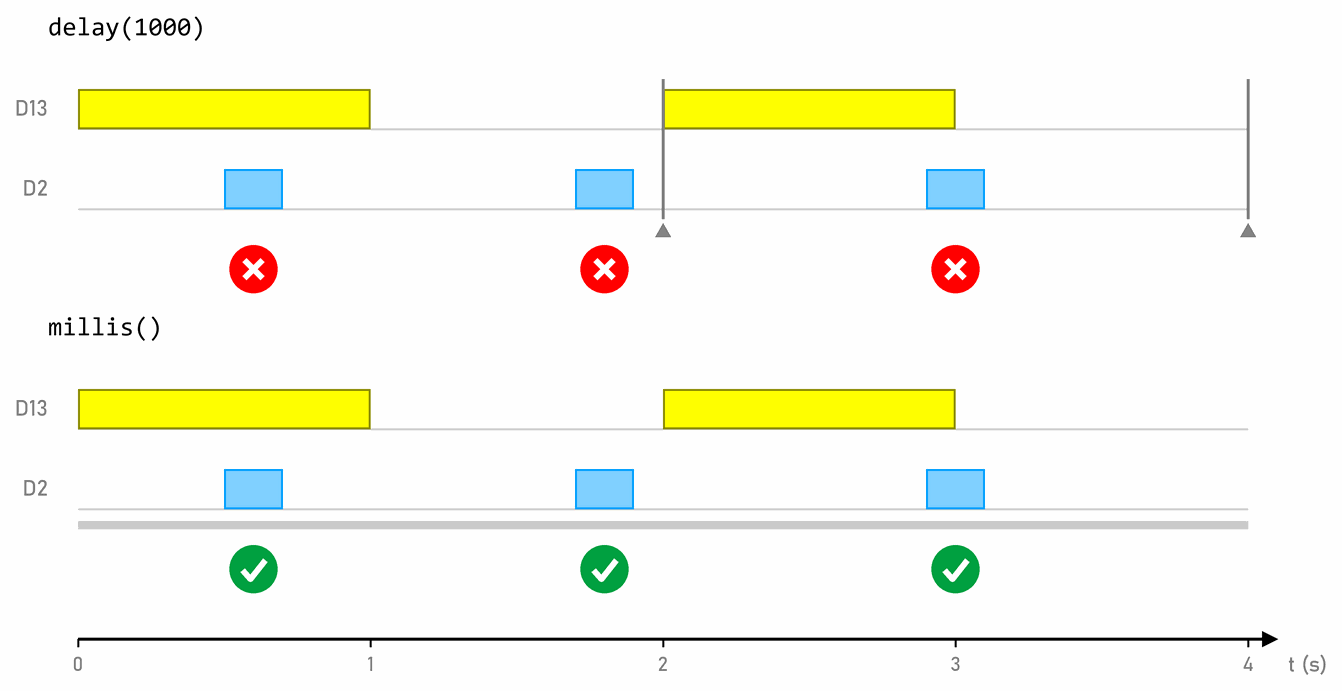
Both programs switch the LED on pin 13 on and off every second and read a button on pin 2. The button is pressed three times for 0.2 s.
- At the top is the program with two
delay(1000)s. It reads the button only after both waits are over, at 2 and 4 seconds (grey lines). All three presses happen while it waits, so it doesn’t see them. - At the bottom is the program with
millis(). It doesn’t wait: on every pass of the loop it checks whether it is time to change the LED, then reads the button straight away. A pass takes less than a millisecond, so it sees all three presses.
millis(): a stopwatch that never stops
The Arduino has a built-in stopwatch, which starts when the Arduino gets power or is reset. millis() tells you how many milliseconds have passed since then. The stopwatch always counts on: the program can’t stop it or set it back to zero.
The number millis() returns is an unsigned long: 32 bits, from 0 to 4,294,967,295 (see Variables and data types). That is why every variable that holds a time must be an unsigned long too. For shorter times there is micros(), which counts microseconds, in steps of 4 µs.
The rule: look at the clock, don’t wait
Instead of waiting, the program remembers when it last did something, and on every pass of the loop checks whether enough time has passed:
// Blinking without delay(): the LED on pin 13 changes every second,
// while loop() keeps running and can do something else as well.

const unsigned long BLINK = 1000;       // ms between two changes
unsigned long lastChange = 0;           // when the LED last changed
bool lit = false;

void setup() {
  pinMode(LED_BUILTIN, OUTPUT);
}

void loop() {
  if (millis() - lastChange >= BLINK) {
    lastChange += BLINK;                // a steady rhythm; lastChange = millis() would slowly fall behind
    lit = !lit;
    digitalWrite(LED_BUILTIN, lit);
  }
  // something else can happen here
}
The condition is always written as millis() - lastChange >= BLINK: now minus the start, is it at least this much? When the time is up, the start moves on in one of two ways:
lastChange += BLINK;moves the start on by exactly one interval. The rhythm stays steady even after an hour, although the condition is sometimes met a millisecond late. This is how to write blinking and anything that has to keep a rhythm.lastChange = millis();starts counting from this moment. Every small delay is added to the next interval, so the rhythm slowly falls behind. This is how to write a wait that starts with an event, for example three seconds after a button is pressed.
What happens after 49.7 days?
An unsigned long can’t be larger than 4,294,967,295. That is 232 ms, about 49.7 days. When the stopwatch reaches that number, the next one is 0, like the mileage counter in an old car going from 99,999 to 00,000. This is called an overflow.
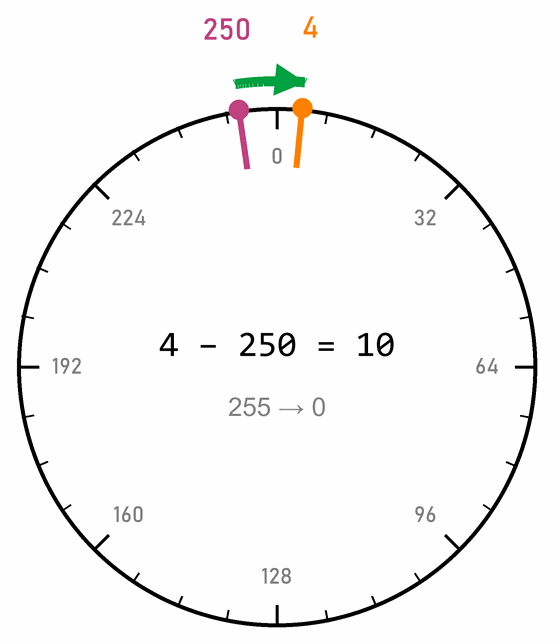
It is easier to see with a single byte, which counts only up to 255. If the start was 250 and now it is 4, the counter has passed zero in the meantime. The subtraction 4 - 250 in a byte doesn’t give −246, but 10: how many steps really passed. The same is true for 32 bits. That is why millis() - lastChange gives the right elapsed time even after the overflow, and the program carries on as if nothing had happened (see Binary, octal and hexadecimal numbers).
A condition written differently, millis() >= lastChange + BLINK, goes wrong around the overflow. In a byte: 250 + 20 overflows to 14, and 252 >= 14 is true after only two steps instead of twenty. The overflow program shows this with real numbers, without waiting 49 days: it makes up a time that starts 296 ms before the overflow, and prints both checks for every 100 ms.
// What happens when millis() passes its largest number after 49.7 days?
// The program doesn't wait 49 days but makes the time up: it starts 296 ms before the overflow
// and prints both ways of comparing. Open the Serial Monitor (9600 baud).

const unsigned long WAIT = 1000;                 // we wait 1000 ms
const unsigned long START = 4294967000UL;        // 296 ms before the overflow

void setup() {
  Serial.begin(9600);
  for (int k = 0; k <= 15; k++) {
    unsigned long now = START + k * 100UL;       // after the overflow it starts again from 0
    Serial.print(now);
    Serial.print("  elapsed ");
    Serial.print(now - START);                   // right even after the overflow
    Serial.print("  right: ");
    Serial.print(now - START >= WAIT ? "yes" : "no");
    Serial.print("  wrong: ");
    Serial.println(now >= START + WAIT ? "yes" : "no");   // START + WAIT overflows to 704
  }
}

void loop() {
}
The right check says yes only once 1000 ms have passed. The wrong one says yes straight away at the start, then no until 704.
Several tasks at once
With millis() each task has its own time variable and its own check, and the loop goes round all of them on every pass. This program combines the blinking from the lesson Two traffic lights at a crossroads with a button: the yellow LED blinks every 0.5 s, the green one every 0.3 s, and while the button is pressed the LED on pin 13 is lit.
// Three tasks at once: the yellow LED on pin 8 blinks every 0.5 s,
// the green one on pin 9 every 0.3 s, and while the button on pin 2 is pressed
// the LED on pin 13 is lit. Each task has its own time.

const int YELLOW = 8;
const int GREEN = 9;
const int BUTTON = 2;

const unsigned long YELLOW_RHYTHM = 500;
const unsigned long GREEN_RHYTHM = 300;

unsigned long lastYellow = 0;
unsigned long lastGreen = 0;
bool yellowLit = false;
bool greenLit = false;

void setup() {
  pinMode(YELLOW, OUTPUT);
  pinMode(GREEN, OUTPUT);
  pinMode(LED_BUILTIN, OUTPUT);
  pinMode(BUTTON, INPUT_PULLUP);        // a pressed button reads LOW
}

void loop() {
  unsigned long now = millis();         // one reading of the time for the whole pass

  // task 1: yellow
  if (now - lastYellow >= YELLOW_RHYTHM) {
    lastYellow += YELLOW_RHYTHM;
    yellowLit = !yellowLit;
    digitalWrite(YELLOW, yellowLit);
  }

  // task 2: green
  if (now - lastGreen >= GREEN_RHYTHM) {
    lastGreen += GREEN_RHYTHM;
    greenLit = !greenLit;
    digitalWrite(GREEN, greenLit);
  }

  // task 3: the button, checked on every pass
  digitalWrite(LED_BUILTIN, digitalRead(BUTTON) == LOW);
}
Connect the LEDs as in the traffic light lesson, each through a 220 Ω resistor, and the button between pin 2 and GND (see Buttons done right). now is measured once at the start of the pass, so all the tasks in that pass work with the same time.
Common mistakes
intinstead ofunsigned long. Aninton an Arduino Uno only goes up to 32,767, so it overflows after just 33 seconds and the time becomes negative.- The time variable inside
loop().unsigned long lastChange = 0;written insideloop()becomes zero on every pass, so the condition is met on every pass. The variable must be outside the functions, orstatic. ==instead of>=.millis()doesn’t always go up by exactly 1: on an Arduino Uno it jumps by 2 about every 42 ms. The conditionmillis() - lastChange == 1000can then skip exactly 1000 and never be met.- One
delay()among the tasks. A singledelay(500)in any task makes all the others wait with it. - Calculating with
intnumbers.60 * 1000is worked out as anintand overflows before it reaches theunsigned long. Write60 * 1000UL(see Variables and data types). millis()in an interrupt. While an interrupt function runs,millis()doesn’t count on. This is described on the Interrupts page.
When is delay() fine?
delay() isn’t forbidden. In setup(), for a short pause of a few milliseconds, and in a program that only does one thing anyway, delay() is simpler and clearer. That is why the first lessons use delay(). You need millis() when the program has to look after something else at the same time.
How accurate is millis()?
The stopwatch counts by the chip’s clock, and the clock isn’t perfect. On many Uno boards the chip gets its clock from a ceramic resonator, which can be off by up to about 0.5 %. That is up to 7 minutes a day, and usually less. For short times (blinking, waiting for a button, a game) you won’t notice. For a clock that has to show the right time for days, use a real-time clock (RTC) module.
When there are more tasks
A program with several tasks and several waits soon becomes hard to follow: what may happen when, and when not? Then a state machine helps, as in the lesson Reaction game. The program is always in one state, and millis() decides when to move on to the next. There is more about this on the State machines page.
Note
The diagrams, graphs and values on this page are calculated from simplified models or are typical examples. They are here to explain, and may differ from the actual specifications of the parts. Before you build anything, always check the datasheets of the parts you use.
 What did we learn?
delay()stops the whole program, whilemillis()only tells you how much time has passed, so the program can carry on.- Time is always checked as
millis() - start >= interval, and time variables areunsigned long. start += intervalkeeps a steady rhythm, whilestart = millis()counts from this moment.- After 49.7 days
millis()overflows to zero, and the subtraction still gives the right elapsed time. - Several tasks at once: each has its own time variable and its own check.
Quick quiz
1. Why does a program with delay(1000) miss a short button press?
delay(1000) runs, the program does nothing else, so it doesn’t read the button either. If the press both started and ended during the wait, the program never sees it.2. What is wrong with the condition millis() >= start + 1000?
start + 1000 overflows to a small number, so the condition is true straight away, before 1000 ms have passed. millis() - start >= 1000 is right even then.3. Why is int lastChange = 0; no good?
int on an Arduino Uno only goes up to 32,767. millis() passes that number after 33 seconds, so a time stored in an int becomes wrong, even negative. It needs to be an unsigned long.4. An LED has to blink in rhythm for hours. Which way of moving the start do you use?
lastChange += BLINK;. The start moves on by exactly one interval, so small delays don’t add up and the rhythm doesn’t fall behind.5. How many days does it take millis() to overflow?