
Short circuit
What a short circuit is, why it is dangerous, how it happens on a breadboard and an Arduino, and how to recognise, find and prevent it.
What is a short circuit?
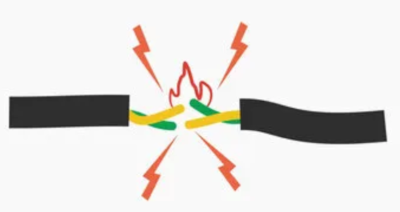
A short circuit can also happen across a single component: if its two legs touch, the current goes around it. We then say that the component is shorted.
Why does the current get so large?
Resistance limits the current in a circuit. Ohm's law tells us this:
- An LED with a 220 Ω resistor: about 2 V is left across the LED and 3 V across the resistor. The current is 3 V / 220 Ω ≈ 14 mA.
- A wire from plus to minus: the wire has a resistance of about 0.05 Ω. The current would be 5 V / 0.05 Ω = 100 A, about seven thousand times more.
In reality the current doesn’t reach 100 A, because the source itself has a little internal resistance, and USB power has protection. But even an ordinary AA battery gives several amps in a short circuit, around a hundred times more than the LED. All that energy turns into heat, so the wire and the battery get hot quickly. Why this is dangerous even at a low voltage is explained in misconception 21.
Why is a short circuit dangerous?
- Wires, the battery and components get very hot. You can burn yourself, and the insulation can melt or catch fire.
- The battery goes flat quickly and can be damaged.
- Components burn out: an LED, a resistor, an Arduino pin, or even the whole board.
- Rechargeable batteries (Li-ion and LiPo, like the ones in phones and drones) give a very large current in a short circuit, and they can swell up and catch fire. That is why we never short-circuit them. The rules for LiPo batteries are on the Drone project page.
Never work with mains voltage!
The voltage from a wall socket (230 V) can kill. In the workshop we only work with low voltages: batteries, USB and adapters. Never open devices that plug into a wall socket, and never connect anything to a wall socket.
How do you recognise a short circuit?
- The Arduino or micro:bit switches off, and the computer may report a USB device error.
- A wire, a battery or a component gets warm or hot.
- The power module gets hot or switches itself off.
- You can smell burning or see smoke.
- A circuit that was working suddenly stops working.
How are devices protected?
Devices are protected from short circuits by parts that cut off the current when it gets too large:
- A fuse has a thin wire that melts when the current gets too large. A multimeter, for example, has one for measuring current. A blown fuse has to be replaced with a new one.
- A circuit breaker in the home wiring switches off the power. When we say that the fuse has tripped, this is what happened. After the repair we switch it back on.
- A resettable fuse cuts off the current while the short circuit is there, and when we remove it, it resets by itself. Most Arduino Uno boards have one on the USB power.
- Protection circuits in chargers, computer USB ports and phone batteries monitor the current and switch off the power.
Protection keeps the power source and the wires safe, but not every component. An LED or an Arduino pin can burn out before the protection kicks in.
Short circuits in our workshop
These are the short circuits that happen most often in the workshop:
- A wire connects plus straight to minus. On a breadboard, one wire in the wrong place between the power rails is enough. See mistakes 8 and 9 on the Breadboard page.
- Two legs of the same component in the same breadboard row. The row shorts them, so the current flows through the metal strip and not through the component. See How to place components.
- Long legs that touch. Sooner or later they touch, and if they are connected to plus and minus, that is a short circuit.
- A potentiometer turned all the way. Its resistance drops to about 0 Ω, so a push button in the same circuit can connect 5 V straight to GND. This example is in the lesson Arduino - step by step.
- A multimeter set to measure current, connected across a battery. When measuring current, a multimeter has a very small resistance, so this is a short circuit. The fuse in the instrument blows. See the lesson Review of electronics basics and measurement.
- 5 V on the breadboard when we don’t need it. If there is no 5 V on the board, there can’t be a short circuit between 5 V and GND either. That is why we don’t connect it in the lesson Traffic lights for cars and pedestrians.
- Two output pins connected to each other. When one pin gives
HIGHand the otherLOW, current flows straight from one pin into the other (see Arduino pins). - A 9 V battery in a pocket or bag with keys and coins. Both its terminals are on the same side, so a piece of metal easily connects them. We carry batteries in a box or holder, and we put a protective cap or a connector on a 9 V battery.
Arduino pins
The microcontroller’s pins have no fuse, and a program cannot stop too much current from flowing. The recommended maximum current for one Arduino Uno pin is about 20 mA, and the absolute maximum is 40 mA.
Whether a connection to a pin is dangerous depends on whether the pin is an input or an output:
- An input (
INPUTorINPUT_PULLUP) may be connected straight to GND or 5 V. This is how we connect push buttons: the button connects the pin to GND, and only a very small current flows through the pin. - An output (
OUTPUT) must not be connected straight to GND or 5 V. An output atHIGHconnected to GND (or atLOWconnected to 5 V) tries to give much more current than allowed and can burn out permanently. The same is true if the program sets the pin with a push button as an output by mistake.
A protective resistor in series with the pin limits the current even when something goes wrong. In the lesson Two traffic lights at a crossroads we connect the pins of two Arduinos through two 470 Ω resistors. If both Arduinos send a message by mistake, the current is at most 5 V / 940 Ω ≈ 5 mA, which doesn’t harm the pins.
The resistor next to an LED (220–330 Ω at 5 V) has a different job: it limits the current through the LED so that neither the LED nor the pin burns out. You can work out its value with the LED resistor calculator. It doesn’t protect against a short circuit: if a wire connects the pin straight to GND around the resistor, the resistor doesn’t help.
USB power: if you short 5 V to GND while the Arduino is on USB, the protection kicks in. The Arduino switches off, and the computer may report a USB device error. On most Uno boards a resettable fuse does this, and it resets by itself when you remove the short circuit. This protection keeps the computer’s USB port safe, not the microcontroller’s pins.
Rules for working with Arduino:
- Only wire and rewire while the USB cable is unplugged.
- Before switching on, check that no wire connects 5 V or 3.3 V straight to GND.
- Always connect LEDs to output pins through a resistor.
- When you connect a pin to a pin of another Arduino or to something you don't know, add a protective resistor (for example 470 Ω).
- Don't power motors, relays, solenoids or LED strips from a pin. Use a transistor, a driver or a module with its own power supply, with a common GND.
- The maximum allowed currents are in the board's technical documentation (datasheet). If you are not sure, ask the workshop leader.
What to do when a short circuit happens
- Switch off the power straight away: unplug the USB cable, switch off the power module or take out the battery.
- Don’t touch hot parts. Wait for them to cool down.
- Call the workshop leader. If you see smoke or a flame, or a battery has swollen up, step back and tell the leader straight away.
- Find the cause before you switch the power back on (see the next section). If you just switch the circuit on again, the short circuit is still there.
How to find a short circuit
First look at the circuit: wires between the power rails, legs that touch, and components with both legs in the same row. There are more tips in the section When the circuit doesn’t work.
If you have a multimeter, you can find a short circuit by measuring continuity (the mode marked with a speaker or diode symbol, see the lesson Review of electronics basics and measurement):
- Switch off the power. Continuity is always measured without power.
- Put one probe on the plus power rail and the other on the minus rail.
- If the multimeter beeps continuously, there is a short circuit between plus and minus. If it beeps only briefly and goes quiet, that is a capacitor charging, and it’s fine.
- Take out the wires or components one at a time, starting with the one you added last, and measure again each time.
- When the beeping stops, the short circuit was in the part you took out last or in its connection. Fix it and put the other parts back.
Short circuits in the real world
Galaxy Note 7 (2016): Samsung recalled all Galaxy Note 7 phones because some of them overheated and caught fire. Airlines banned them on planes. The investigation showed that the cause was a short circuit inside the battery. In a battery, a thin insulating layer keeps plus and minus apart. In some of the batteries there wasn't enough room, so this layer was damaged, and in others sharp bits left over from welding pierced it.
The great blackout (2003): on 14 August 2003 in Ohio (USA), a hot power line sagged and touched trees that hadn't been trimmed. This caused a short circuit, and the line switched off. The current moved to the neighbouring lines, which also overheated, touched trees and switched off. In just over an hour, about 50 million people in the USA and Canada were left without power.
 What did we learn?
- A short circuit happens when current finds a path with a very low resistance, most often a wire between plus and minus. The current then gets very large, and wires, batteries and components heat up and can burn out.
- When we notice a short circuit, we switch off the power straight away, call the workshop leader and find the cause before switching on again.
- An Arduino output pin must not be connected straight to GND or 5 V. A protective resistor limits the current when something goes wrong.
- The easiest way to find a short circuit is a multimeter in continuity mode, with the power off.
Short quiz
1. Why does a wire get hot when we use it to connect the plus and minus of a battery?
2. You notice that the battery in your circuit is hot. What do you do first?
3. The Arduino switches off as soon as you press the push button. What is the most likely cause?
4. May an Arduino pin be connected straight to GND?
INPUT or INPUT_PULLUP), yes: that is how we connect a push button. If the pin is an output at HIGH, no, because too much current would flow through it and the pin could burn out.5. A multimeter in continuity mode beeps continuously between the plus and minus rails of the breadboard. What does this mean and what do you do?
6. Why don't we carry a 9 V battery in a pocket with keys or coins?