
State machines
How to split a program into states: the state diagram, a micro:bit game, enum and switch on an Arduino, the entry action, a state table and a crossing button.
Everything is in some state
A traffic light always shows one thing: green, yellow or red. A washing machine washes, rinses or spins. A game waits for a player, is being played, or is over. Each of these is always in exactly one state, and it moves from one state to another when something happens: some time passes, someone presses a button, the water reaches the right level.
A program that works this way is called a state machine. Many devices around us are built like this, from traffic lights and washing machines to drinks machines and pinball machines.
The state diagram
A state machine is easiest to draw. Each state is a box, and an arrow shows where the program can go next, and when.
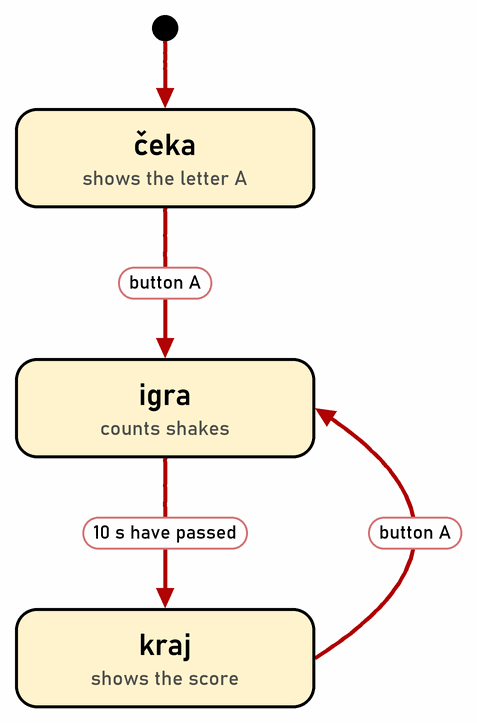
This is a game for the micro:bit: who can shake it more times in 10 seconds. The state names are the ones in the program: čeka (Croatian for “waiting”), igra (“game”) and kraj (“end”).
- The game starts in the state čeka (the black dot shows the start) and shows the letter A on the display.
- Button A starts the state igra. The micro:bit counts every shake.
- When 10 seconds have passed, the game moves to the state kraj and shows the number of shakes.
- Button A starts a new game.
Draw the diagram before you write the program. That way you see straight away what may happen in which state. Button A, for example, does nothing while the game is running, because no arrow with button A leaves the state igra.
A state machine on the micro:bit
In MakeCode the state is an ordinary variable, called stanje (Croatian for “state”), with the values čeka, igra and kraj. In the forever block, the program uses if / else if blocks to ask which state it is in, and does only what that state needs:
- If
stanjeis čeka, show the letter A. - Otherwise, if it is igra, show the score as bars and check whether 10 seconds have passed. If they have, set
stanjeto kraj. - Otherwise show the score.
The on button A pressed block changes the state to igra, but only if the game is in the state čeka or kraj. The on shake block adds a point only in the state igra. We met variables and conditions in the lesson Lives and conditions.
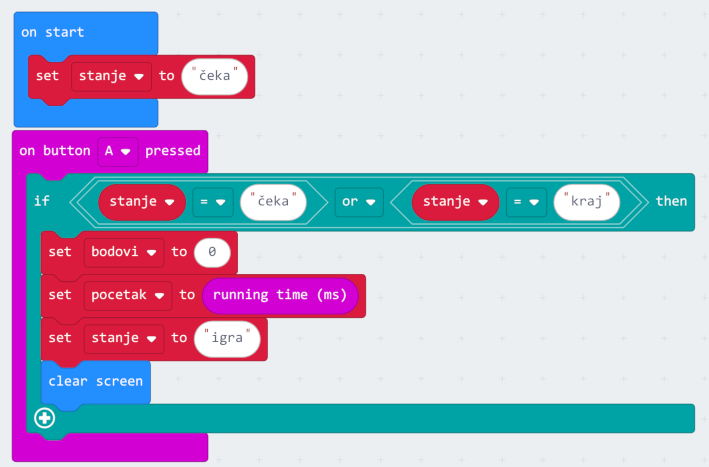

Try changing one thing: make the game last 5 seconds, or make button B take the game from kraj back to čeka. When you add a new arrow, add it to the diagram first.
State machines at the Arduino workshop
What we already know
In the lesson Reaction game the states were numbers with names (const int WAITING = 0;), a variable state remembered the current state, and switch (state) ran only the part of the program for that state. This page adds four things: state names with enum, the entry action, the state table and several machines in one program.
State names with enum
Instead of giving each state a number ourselves, enum (enumeration) lists the names and gives them numbers on its own:
enum State { CARS_GREEN, CARS_BLINK, CARS_YELLOW, WALK, ALL_RED, CARS_RED_YELLOW };
State state;
State is now a new data type, like int, and the variable state can only have one of these values. Two states can’t get the same number by accident, and you add a new state just by writing its name.
Transitions: an event and a time
The program moves from state to state because of:
- an event: someone pressed a button, a sensor saw the ball, a message arrived;
- a time: it has been in the state long enough. Time is measured with
millis(), from the moment it entered the state (see millis() instead of delay()).
Some transitions need both. In the example below, cars get yellow only when a pedestrian has pressed the button and the green has lasted at least 10 seconds.
The entry action: do it once
Some things should happen only once, when the program enters a state: switching on the lights, remembering the time it entered, clearing the display. If you put them in a case in loop(), they run thousands of times a second. So a transition is written as a function that changes the state and straight away does this entry action:
void enter(State next) {
  state = next;
  inState = millis();          // from now on the time in this state is measured
  switch (next) {
    case CARS_YELLOW: lights(false, true, false, false); break;
    // ... the lights for each state
  }
}
Every transition in the program is then just enter(CARS_YELLOW);, and you can’t change the state and forget to switch on the lights or remember the time.
The state table
Before the program, write a table: for each state, what it does, what ends it and where the program goes next. If something is missing from the table, it will be missing from the program too.
| State | Lights | What ends it | Next state |
|---|---|---|---|
CARS_GREEN | cars green, pedestrians red | a request and at least 10 s | CARS_BLINK |
CARS_BLINK | the cars’ green blinks | 3 s have passed | CARS_YELLOW |
CARS_YELLOW | cars yellow | 3 s have passed | WALK |
WALK | cars red, pedestrians green | 6 s have passed | ALL_RED |
ALL_RED | everyone red | 2 s have passed | CARS_RED_YELLOW |
CARS_RED_YELLOW | cars red and yellow | 1 s has passed | CARS_GREEN |
Example: a pedestrian crossing with a button
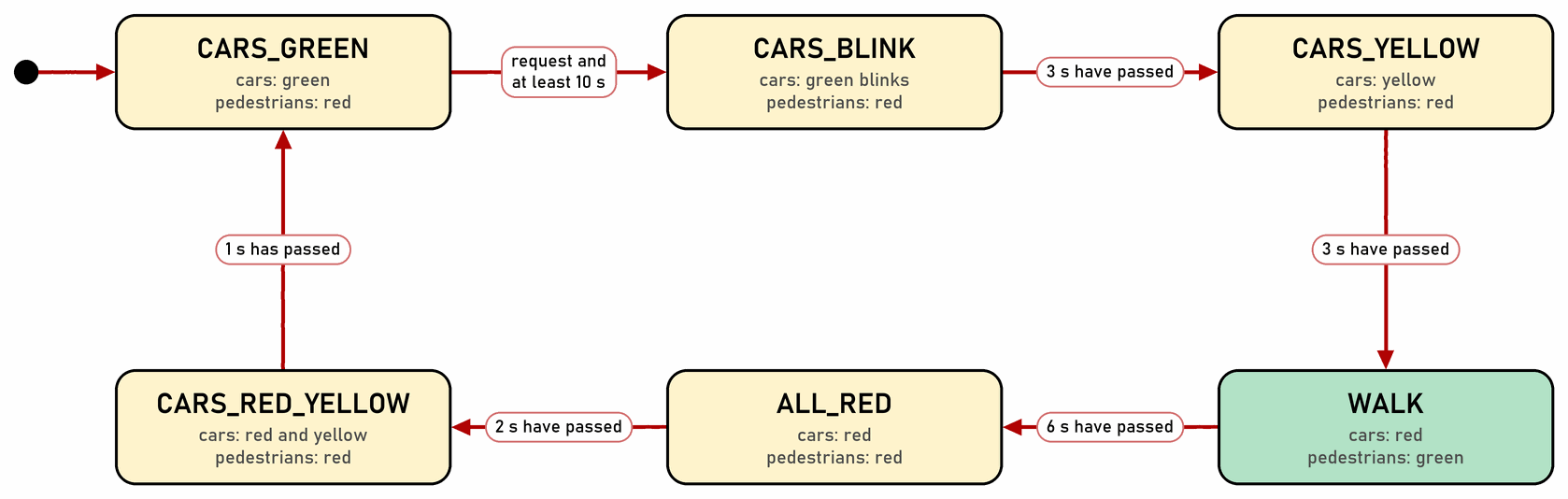
The traffic light from the lesson Traffic lights for cars and pedestrians changed its lights in a loop, whether anyone was waiting or not. Now cars keep green until a pedestrian presses the button. Wire the lights as in that lesson (cars on pins 10, 9 and 8, pedestrians on 7 and 6), and the button between pin 2 and GND, as in the lesson Buttons done right.
// A pedestrian crossing with a button, as a state machine.
// Cars have green until a pedestrian presses the button. Then the green blinks,
// then yellow, then pedestrians get green, then everyone red, then cars red and yellow.
// The lights are wired as in the pedestrian traffic light lesson, the button between pin 2 and GND.

const int carRed = 10;
const int carYellow = 9;
const int carGreen = 8;
const int walkRed = 7;
const int walkGreen = 6;
const int button = 2;

const unsigned long MIN_GREEN = 10000;     // cars have green for at least 10 s
const unsigned long BLINKING = 3000;
const unsigned long YELLOW = 3000;
const unsigned long WALKING = 6000;
const unsigned long ALL_STOP = 2000;
const unsigned long RED_YELLOW = 1000;

enum State { CARS_GREEN, CARS_BLINK, CARS_YELLOW, WALK, ALL_RED, CARS_RED_YELLOW };

State state;
unsigned long inState = 0;    // when the program entered the current state
bool request = false;         // whether a pedestrian has pressed the button

void lights(bool red, bool yellow, bool green, bool walk) {
  digitalWrite(carRed, red ? HIGH : LOW);
  digitalWrite(carYellow, yellow ? HIGH : LOW);
  digitalWrite(carGreen, green ? HIGH : LOW);
  digitalWrite(walkGreen, walk ? HIGH : LOW);
  digitalWrite(walkRed, walk ? LOW : HIGH);
}

// Moving to a new state: remember the time and set the lights once (the entry action).
void enter(State next) {
  state = next;
  inState = millis();
  switch (next) {
    case CARS_GREEN:      lights(false, false, true, false); break;
    case CARS_BLINK:      lights(false, false, true, false); break;
    case CARS_YELLOW:     lights(false, true, false, false); break;
    case WALK:            lights(true, false, false, true); request = false; break;
    case ALL_RED:         lights(true, false, false, false); break;
    case CARS_RED_YELLOW: lights(true, true, false, false); break;
  }
}

void setup() {
  pinMode(carRed, OUTPUT);
  pinMode(carYellow, OUTPUT);
  pinMode(carGreen, OUTPUT);
  pinMode(walkRed, OUTPUT);
  pinMode(walkGreen, OUTPUT);
  pinMode(button, INPUT_PULLUP);      // a pressed button reads LOW
  enter(CARS_GREEN);
}

void loop() {
  unsigned long elapsed = millis() - inState;

  // A press is remembered in every state except while pedestrians already have green.
  if (digitalRead(button) == LOW && state != WALK) {
    request = true;
  }

  switch (state) {
    case CARS_GREEN:
      if (request && elapsed >= MIN_GREEN) enter(CARS_BLINK);
      break;
    case CARS_BLINK:
      digitalWrite(carGreen, (elapsed / 250) % 2 ? HIGH : LOW);   // 250 ms off, 250 ms on
      if (elapsed >= BLINKING) enter(CARS_YELLOW);
      break;
    case CARS_YELLOW:
      if (elapsed >= YELLOW) enter(WALK);
      break;
    case WALK:
      if (elapsed >= WALKING) enter(ALL_RED);
      break;
    case ALL_RED:
      if (elapsed >= ALL_STOP) enter(CARS_RED_YELLOW);
      break;
    case CARS_RED_YELLOW:
      if (elapsed >= RED_YELLOW) enter(CARS_GREEN);
      break;
  }
}
requestremembers the press. A pedestrian doesn’t have to hold the button, and a press that arrives just after the cars got green waits until the 10 seconds are up. The entry action of the stateWALKclears it.ALL_REDgives pedestrians 2 seconds to leave the crossing before cars get red and yellow.CARS_BLINKis the only state that does something on every pass: it switches the green on and off every 250 ms, according to the time in the state.- There is no
delay()anywhere. So the program reads the button at every moment, even in states that last several seconds.
Several machines in one program
A program can have several state machines, each with its own state variable and its own time, and loop() goes round all of them on every pass. In the lesson Two traffic lights at a crossroads each Arduino has its own traffic light, and the pinball machine can have a machine for the game (waiting for a player, playing, over), one for the ball (on its way, in play, lost) and one for the lamps while nobody is playing. Each is simple, and together they run the whole machine.
Common mistakes
delay()in a state. While it waits, the program doesn’t read buttons or sensors. The time in a state is measured withmillis().- A forgotten
break. Withoutbreakat the end of acase, the program carries on into the nextcase, as if it were in two states at once. - Changing the state without the entry action.
state = CARS_YELLOW;written directly doesn’t remember the entry time or switch on the lights. Always move withenter(). - A state with no way out. If no arrow leaves a state, the program stays in it for ever. The diagram shows this straight away.
- Too many states. Once there are more than a dozen, the state table helps you not get lost. Often a large machine can be split into two smaller ones.
 What did we learn?
- A state machine is a program that is always in exactly one state, and moves to another when something happens or some time passes.
- The state diagram is drawn before the program: the boxes are the states, the arrows the transitions.
- On the micro:bit the state is a variable, and if / else if blocks do what the state needs.
- On an Arduino,
enumgives the states names,switchpicks the part of the program for the state, and the functionenter()does the entry action once. - The state table shows what each state does and where it leads, before you start writing the program.
Quick quiz
1. Which state is the micro:bit game in while it waits for button A the first time?
2. What would happen if button A also worked in the state igra?
3. Why are the lights switched in the function enter(), and not in the case parts in loop()?
loop() they would be set thousands of times a second, and enter() also remembers the entry time. So you can’t change the state and forget the lights.4. A pedestrian presses the button 2 seconds after the cars got green. When do pedestrians get green?
5. What is the state ALL_RED for?