
Variables and data types
What a variable is and how the micro:bit and Arduino use it: the types int, long, float, char and bool, their ranges, const and common mistakes with numbers.
A little box with a name
A program has to remember lots of things: how many points you have, how many lives you have left, whether the game is still on. That’s what a variable is for: a little box with a name, in which the program keeps one piece of data.
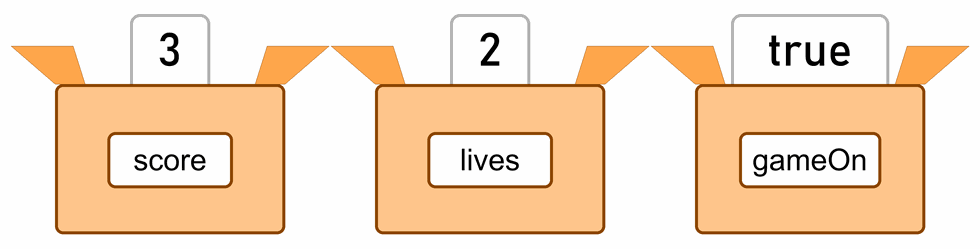
The box’s name stays the same, but the program may change what’s inside while it runs. That’s why it’s called a variable: it can vary.
A program does three things with a variable:
- It makes it and gives it a name, for example score.
- It stores a value in it. Whatever was in the box before disappears, because the box only remembers the last value.
- It reads what’s in it, for example to show the score on the display.
Which language do we write Arduino programs in?
We write programs for the Arduino in the programming language C++ (say C plus plus). C++ was made in the early 1980s as an extension of the language C, and today it's used to write games, web browsers and programs for cars and rockets.
The Arduino adds ready-made functions to C++, like pinMode(), digitalWrite() and delay(), and two functions every program must have, setup() and loop(). A real C++ program starts with the function main(). The Arduino writes it for you: it calls setup() once, and then repeats loop() forever.
The blocks in MakeCode are a program in a real programming language too, JavaScript. At the top of MakeCode click JavaScript, or Python in the menu next to it, and you'll see the same program written in words.
Kinds of data
Only one kind of data fits in one variable:
- a number, for example the score or a temperature;
- text, for example a player’s name;
- true or false: true (yes) or false (no), for example whether the game is on.
MakeCode works out the kind by itself, from the first value you store in the variable. If you store 0 in score at the start, it’s a variable for numbers, so store only numbers in it after that.
How variables are used on the micro:bit is in the section Variables in MakeCode, and for the Arduino workshop there’s the section Variables in an Arduino program.
Variables in MakeCode
Variables are in the Variables category:
- Click Make a Variable…, type a name and click OK.
- The set score to 0 block stores a value. You usually put it in on start, so the game starts from zero.
- The change score by 1 block increases the value by 1. With −1 it decreases it, as when a player loses a life.
- The round score block reads the value. You put it into another block, for example show number.
We first used variables for points in the lessons My first program in MakeCode and How does our program think?. In the lesson Lives and conditions the variable zivoti (Croatian for “lives”) counts down, and igraTraje (“the game is on”) remembers only true or false. In Radio games the variable protivnik (“opponent”) starts with the value −1, because there’s no such sign: that’s how the program knows the opponent’s sign hasn’t arrived yet.
A good name for a variable
- Let the name say what's in the variable: score, not x. In a week you won't remember what x was.
- No spaces and no letters like č, ć, đ, š and ž: lives, gameOn. When a name has several words, start each new word with a capital letter.
- Capital and small letters are different: score and Score are two different variables.
Variables in an Arduino program
From here on, the page is for the Arduino workshop.
How to make a variable
In a C++ program we make a variable in one line. We write its type, its name and, if we want, what’s in it at the start:
int score = 0;           // type, name and starting value
bool gameOn = false;     // true or false
float voltage = 4.85;    // a decimal number: with a point, not a comma
This is called a declaration. After it, we write the name without the type:
score = 10;              // store 10, and the old value disappears
score = score + 1;       // read it, add 1 and store it back: now it's 11
score++;                 // the same, shorter: 12
score += 5;              // add 5: 17
The = sign doesn’t mean equals, but store: it stores the value on the right in the variable on the left. That’s why score = score + 1 isn’t a mistake in the sum. To ask whether two values are equal, we use ==.
= isn't the same as ==
if (score = 10) doesn't ask whether score equals 10; it stores 10 in score. The condition is then always true, and the old score is lost. The compiler doesn't report it as an error, so in a condition always check that there are two equals signs: if (score == 10).
The same rules for names apply as in MakeCode, and a few more:
- A name may have letters, digits and the underscore
_, but it mustn’t start with a digit:led2is fine,2ledisn’t. The Arduino doesn’t accept letters like č, ć, đ, š and ž in names (see the lesson Traffic lights for cars and pedestrians). - A name mustn’t be a word C++ already uses, like
int,iforfor. - Avoid the names of Arduino functions and C functions, like
time,random,linkorsignal. On some Arduinos a name like that causes an error when compiling.
Data types
Each type takes a fixed number of bytes of memory, so only numbers from a fixed range fit in it. On the Arduino Uno R3, the Nano and the Mega, which have an 8-bit microcontroller, it looks like this (one square is one bit):
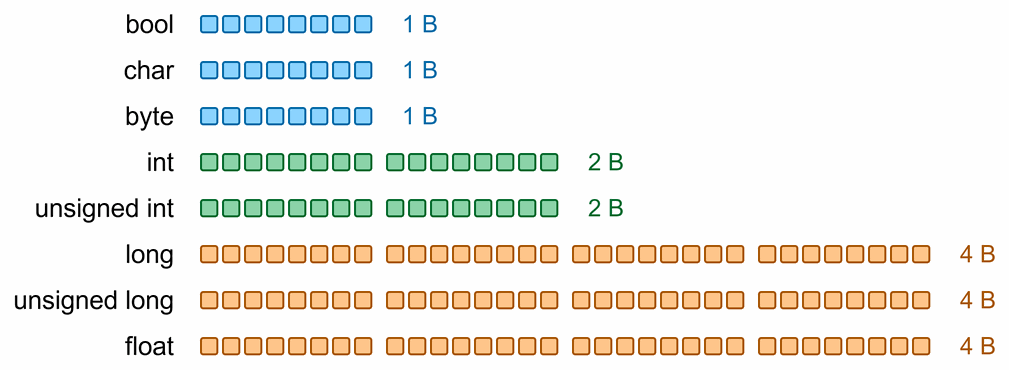
| Type | Bytes | Range | What we use it for |
|---|---|---|---|
bool | 1 | true or false | yes or no: is the button pressed, is the game on |
char | 1 | −128 to 127 | one character, for example 'A' or '#' |
byte | 1 | 0 to 255 | small numbers and bytes, for example a row of a picture on an LED matrix |
int | 2 | −32,768 to 32,767 | most numbers: pins, counters, analogRead() |
unsigned int | 2 | 0 to 65,535 | whole numbers without a sign, up to 65,535 |
long | 4 | −2,147,483,648 to 2,147,483,647 | large whole numbers |
unsigned long | 4 | 0 to 4,294,967,295 | the time from millis() |
float | 4 | about ±3.4 · 1038, 6 to 7 digits | decimal numbers: voltage, temperature |
Unsigned means without a sign: a type like that has no negative numbers, so its largest number is twice as big. Why it’s exactly like that is explained on the page Binary, octal and hexadecimal numbers.
How to choose a type:
- For most numbers,
intis enough. - Always store the time from
millis()in anunsigned long, because anintfills up in 33 seconds (the lesson Two traffic lights at a crossroads). For the same reason, in the lesson Buttons done right a counter that grows fast gets anunsigned long. - For yes or no, use
bool, likeledModein the lesson Voltage divider, Arduino and PWM. - A
charstores the keypad’s characters, as in the lesson Many switches on few pins. - Use
floatonly when you need decimals. The Uno has no hardware for working with decimal numbers, so it’s slower with them, and afloatremembers only 6 to 7 digits: it stores 1234.5678 as roughly 1234.568.
Not every int is the same
The ranges in the table apply to 8-bit microcontrollers. On the Uno R4, the Giga and the ESP32, which have a 32-bit microcontroller, an int has 4 bytes, like a long, and numbers up to 2,147,483,647 fit in it. A program that fills an int on the Uno R3 therefore behaves differently there.
When a number must have exactly a given number of bits on every microcontroller, use the types that have the number of bits in their name: int16_t (16 bits with a sign), uint8_t (8 bits without a sign, the same as byte) or uint32_t (32 bits without a sign).
A value that doesn’t change: const
The word const in front of the type says that the value doesn’t change while the program runs:
const int ledPin = 9;                  // the pin the LED is connected to
const unsigned long DEBOUNCE_TIME = 50; // a number with a special meaning: in capitals
If the program tries to change a value like that, the compiler reports an error. That way the program can’t change a pin number by accident. In the lessons we write pins like ledPin, and numbers with a special meaning in capitals, like BLINK in the lesson on traffic lights for pedestrians and DEBOUNCE_TIME in the lesson on buttons.
Where a variable lives
Where you write a variable in the program decides how long it exists and who may use it:
- A variable above
setup()(global) is made when the program starts and keeps its value while the program runs. Every function may use it. If you don’t give it a starting value, it’s 0 at the start. - A variable inside a function, for example inside
loop()(local), is made anew at every call and disappears at the end of the function. Only that function may use it, and if it’s written inside curly brackets{ }, only the part of the program inside them.
A local variable without a starting value
A local variable without a starting value isn't 0: it holds whatever happened to be left in memory. So write it with a starting value, int total = 0;, not just int total;.
When to use which is explained under Where do we write variables? in the lesson Two traffic lights at a crossroads.
Working with whole numbers
When you divide two whole numbers, the result is a whole number too. The remainder is dropped, not rounded: 7 / 2 is 3, and 9 / 10 is 0. The % sign gives the remainder: 7 % 2 is 1.
You get a decimal result only if at least one of the numbers is decimal: 7 / 2.0 is 3.5. It isn’t enough to store the result in a float. In the line float x = 7 / 2; the Arduino first divides two whole numbers, and only then stores 3 in x, so x is 3.00.
When a number goes past the largest value of its type, it starts again: a byte of 255 is 0 after + 1, and an int of 32,767 jumps to −32,768. It’s hardest to spot when it happens in the middle of a calculation:
unsigned long wrong = 60 * 1000;    // 4294961760, not 60000
unsigned long right = 60 * 1000UL;  // 60000
The Arduino multiplies 60 and 1000 as two ints, and 60,000 doesn’t fit in an int. It stores the broken result only at the end, so a one-minute wait lasts 49 days. UL after a number says that the number is an unsigned long, so the whole calculation is done in that type. The compiler gives only the warning integer overflow in expression, and only if warnings are switched on: in the Arduino IDE in File → Preferences → Compiler warnings.
Try it yourself
This program shows all the traps on this page. Upload it, open the Serial Monitor and compare what it prints with the comments:
void setup() {
  Serial.begin(9600);

  int a = 7;
  int b = 2;
  Serial.println(a / b);            // 3: whole numbers, the remainder is dropped
  Serial.println(a % b);            // 1: the remainder of the division
  Serial.println(a / 2.0);          // 3.50: 2.0 is a decimal number
  float wrong = a / b;              // divides whole numbers, and only then stores it in a float...
  Serial.println(wrong);            // ...so it's 3.00

  byte counter = 255;               // the largest byte
  counter = counter + 1;
  Serial.println(counter);          // 0: the number has started again

  unsigned long wrongTime = 60 * 1000;    // 60 and 1000 are ints, and 60000 doesn't fit in an int
  unsigned long rightTime = 60 * 1000UL;  // UL: work it out as an unsigned long
  Serial.println(wrongTime);        // 4294961760
  Serial.println(rightTime);        // 60000

  char letter = 'A';
  Serial.println(letter);           // A
  Serial.println(letter + 1);       // 66: the number of the next character
  Serial.println(char(letter + 1)); // B
}

void loop() {
}
The last three lines show that a char is really a number too: the letter A has the number 65, B 66 and so on. Serial.println() prints a character as a letter only while it’s of type char. letter + 1 is already an int, so it prints it as a number, and char(...) turns it back into a character.
Serial.println() prints a decimal number with two decimals. For more decimals, add how many: Serial.println(voltage, 4);.
 What did we learn?
- A variable has a name, and the program keeps one piece of data in it. A variable remembers only the last value.
- In MakeCode, variables are in the Variables category, and MakeCode works out the kind of data by itself. In an Arduino program we write the type in front of the name:
int score = 0;. =stores a value, and==asks whether two values are equal.- Each type has a fixed number of bytes and a range. For most numbers
intis enough, for timeunsigned long, for yes or nobool, andfloatonly when we need decimals. constprotects a value from being changed. A global variable keeps its value while the program runs, and a local one is made and disappears with its function.- Dividing two whole numbers drops the remainder, and a number that goes past the range of its type starts again, even in the middle of a calculation.
Quick quiz
1. What is a variable?
2. You store 5 in the variable score, and then 8. What's in it?
3. Why mustn't a variable be called životi?
4. Which type do you choose for the time from millis()?
unsigned long. An int fills up in just 33 seconds, while an unsigned long holds a time of 49 days.5. What is 9 / 4 in an Arduino program, and what is 9 % 4?
9 / 4 is 2, because the remainder of whole numbers is dropped. 9 % 4 is 1, the remainder of the division.6. What does if (state = 3) do?
state, and the condition is always true. The program meant to ask if (state == 3).7. Why doesn't unsigned long minute = 60 * 1000; give 60000?
ints, so the Arduino multiplies them as ints, and 60,000 doesn’t fit in an int. It stores the broken result only at the end. The right way is 60 * 1000UL.8. The local variable int total; is written without a starting value. What is total?
int total = 0;. A global variable without a starting value would be 0.