
Radio games
How micro:bits talk over radio: radio groups, a number or text as a message, rock-paper-scissors for two and hot potato for nine players.
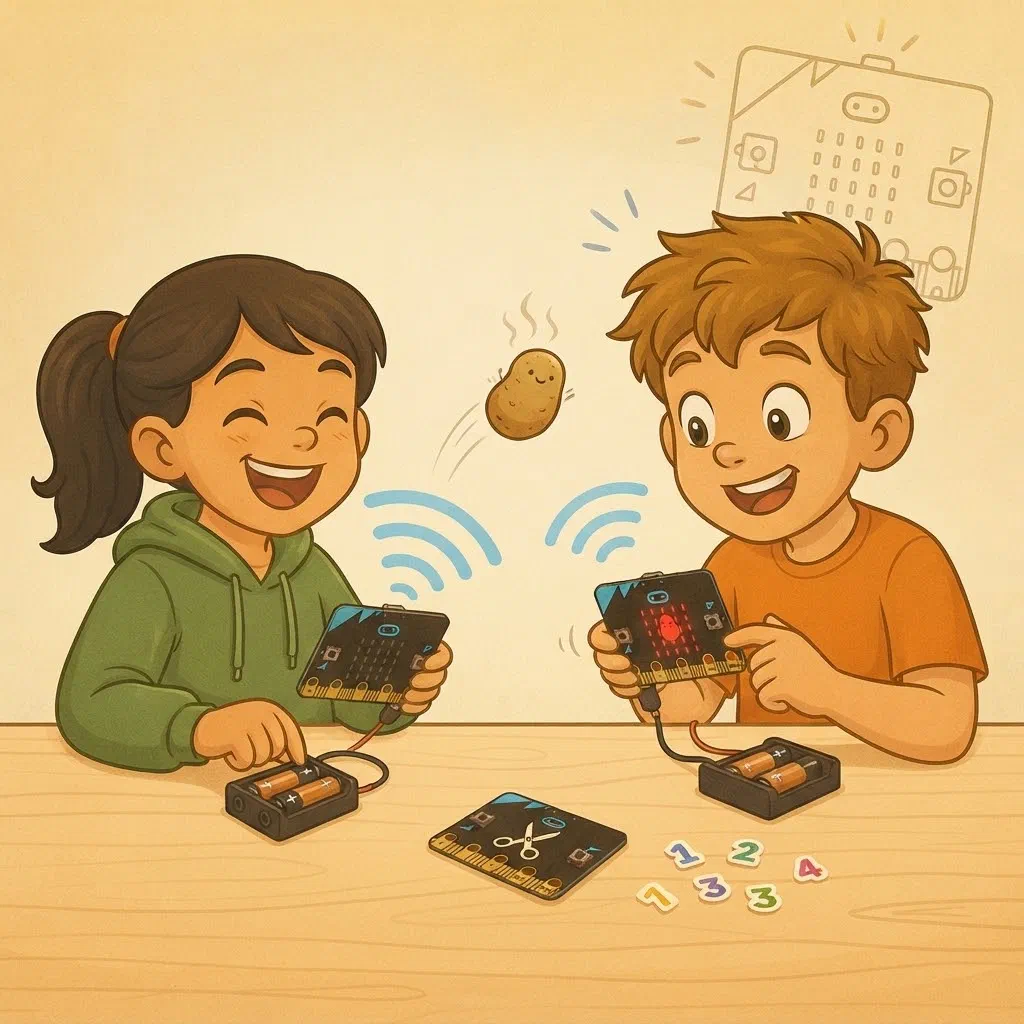
Today we’ll play games over radio. We’ll learn:
- what radio is and how a message travels through the air;
- who hears a message and who reacts to it;
- how to send a number and how to send text;
- how to send a message to exactly one player, even though everyone hears it.
We’ll play two games: rock, paper, scissors for two and hot potato for the whole group.
What is radio?
Radio sends messages through the air, without wires.
The device that sends a message is called a transmitter. It turns the message into invisible radio waves, which spread out in all directions, like rings on water when you throw a pebble in. The device that receives the message is called a receiver. It catches the waves with its antenna and turns them back into the message.
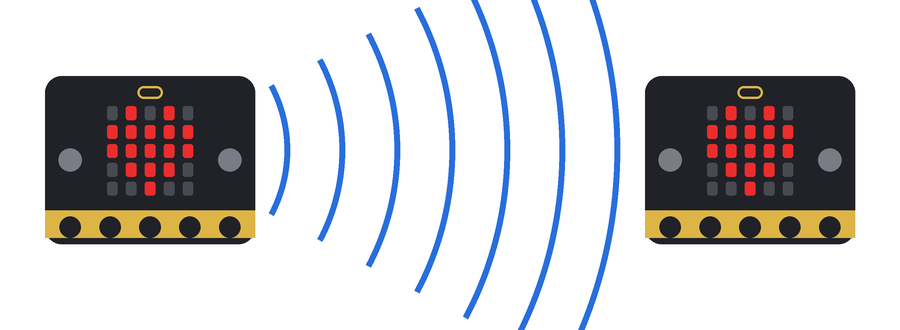
The micro:bit has a built-in antenna, so it can be both a transmitter and a receiver. The program decides which.
You use radio every day even without a micro:bit: walkie-talkies, mobile phones, Wi-Fi, wireless headphones and remote-control cars all send and receive radio waves.
How fast do the micro:bit's radio waves vibrate?
The micro:bit sends radio waves at a frequency of 2.4 GHz, the same as Wi-Fi and Bluetooth. That means the wave vibrates 2.4 billion times a second!
Radio waves travel at the speed of light, so a message gets across the classroom almost instantly.
Who hears the message?
When a micro:bit sends a message, the waves reach every micro:bit nearby. But only the ones in the same radio group react to the message. The others hear it but skip it.
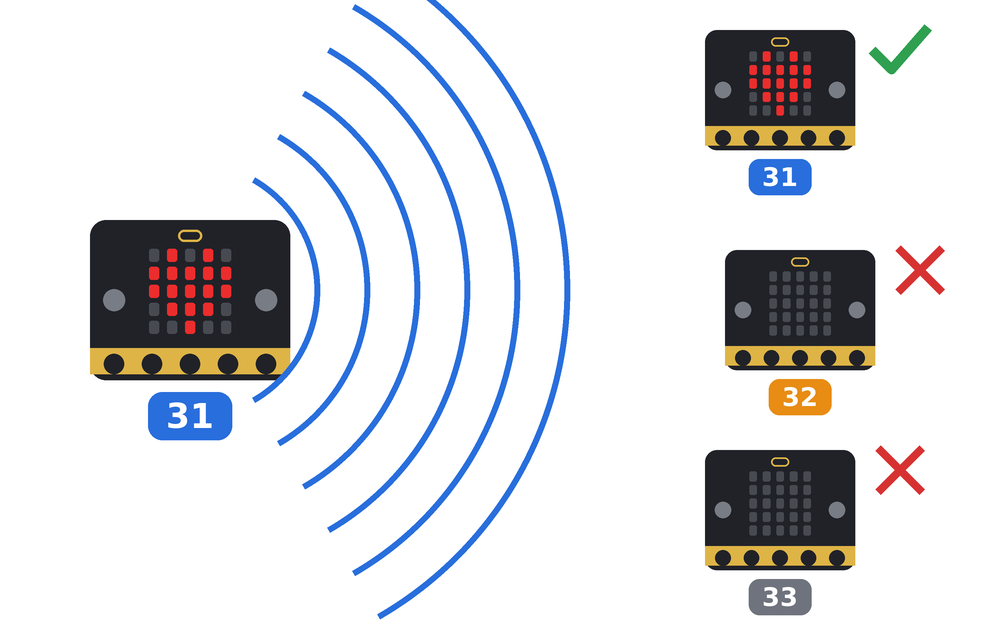
Remember two more things:
- A micro:bit doesn’t hear its own message. A message is always meant for others.
- Nobody reports that a message has arrived. The micro:bit sends a message and doesn’t know whether anyone received it. We’ll come back to this at the end of the workshop.
What can we send?
| Message | Block for sending | Block for receiving | What we use it for |
|---|---|---|---|
| A number | 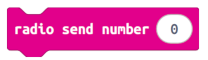 | 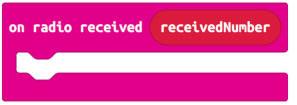 | A choice: which sign |
| Text |  | 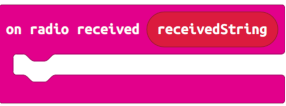 | A command: “new round” |
| A name and a number | 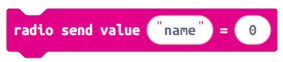 | 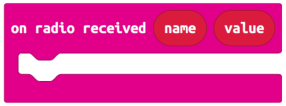 | An address and a value: to whom and how much |
You already know numbers from the traffic lights; text and a name with a number are new. Keep text short: the micro:bit sends at most 19 letters over radio, and the name of a message can have at most 8 letters.
Both micro:bits have to know in advance what each message means. As in the traffic lights: the number 2 doesn’t mean green by itself; that’s what we agreed.
Exercise 1: Rock, paper, scissors
Technique: agreed messages and fair play
This game is played by two participants who sit next to each other, each with their own micro:bit and battery pack. If someone is left without a partner, they play against the leader.
You know the rules: rock breaks scissors, scissors cut paper, and paper wraps rock. If both players choose the same, it’s a draw.
Agreed messages
| Message | Meaning | On the screen |
|---|---|---|
| 0 | rock | small square |
| 1 | paper | big square |
| 2 | scissors | scissors |
| NOVA | new round | – |
NOVA is Croatian for “new”. Each pair gets its own radio group, written on a sticker (31, 32, 33…). In the program, change the group number to the number on your sticker.
How to play
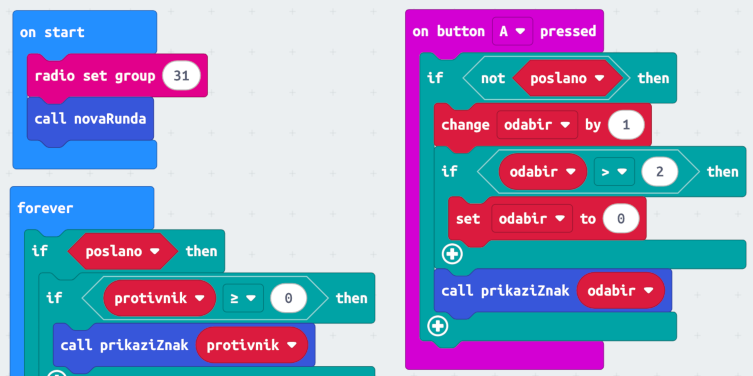
- Button A changes the sign: rock ⇒ paper ⇒ scissors ⇒ rock…
- Button B sends the chosen sign.
- When both have sent, the opponent’s sign appears on the screen. Compare the signs and decide yourselves who won.
- Touching the logo starts a new round on both micro:bits.

Fair play
- No peeking. Your neighbour’s sign arrives as soon as they send it, but your micro:bit only remembers it. It shows it only when you have sent yours too. That’s a condition inside a condition, as in the steady-hand game.
- No changing your mind. The variable poslano (Croatian for “sent”) remembers whether you have already sent your sign (true or false). After sending, buttons A and B don’t change anything until the new round.
- At the start there is no opponent’s sign. The variable protivnik (“opponent”) then has the value −1, because there’s no such sign. As soon as a real sign arrives (0, 1 or 2), protivnik becomes 0 or more.
The function prikaziZnak (“show sign”) gets the number of a sign and shows its picture, like the function Svjetlo in the traffic light. The function novaRunda (“new round”) puts everything back to the start, so we call it in three places. The variable odabir (“choice”) holds the sign you have chosen.
For the chosen sign we send a number, and for a new round we send text. That way a choice and a command can’t get mixed up.
Predict
- Your neighbour has sent their sign, and you haven’t yet. What does your screen show?
- What will happen if your neighbour has a different radio group?
- You touch the logo. What happens on your neighbour’s micro:bit?
Try it
Play a few rounds. If the opponent’s sign doesn’t appear, check:
- that you have both pressed B;
- that you both have the same radio group number;
- that the battery pack is switched on.
Change one thing
Draw your own pictures for rock, paper and scissors with the show leds block, for example a fist, an open hand and two fingers. Will your neighbour see your pictures or their own? Why?
How could the micro:bit judge by itself?
So far you decide who won. But when you have both sent your signs, the micro:bit knows everything it needs: your sign (odabir) and the opponent’s (protivnik). We only have to tell it four things.
1. When to judge. Only when it knows both signs. Your neighbour’s sign can arrive before yours or after it, so the micro:bit has to be able to wait.
2. How to show it. First your sign, for at least a second, then the opponent’s sign, and a second later the result. If it showed everything at once, you couldn’t see who chose what.
3. The rules. If both numbers are the same, it’s a draw. A win is one of these three cases:
| Your sign | Opponent’s sign |
|---|---|
| rock (0) | scissors (2) |
| paper (1) | rock (0) |
| scissors (2) | paper (1) |
In every other case, you lost.
4. The result. A happy face for a win, a sad face for a loss, and a “meh” face for a draw.
In the first version, the forever block kept asking whether your neighbour’s sign had arrived. Now we’ll do everything in order, straight after button B is pressed: send, show your sign, wait for your neighbour’s, show it, judge.
Exercise 2: The micro:bit judges
Technique: waiting for a message and judging
We carry on in the same project.
How to play
- Button A changes the sign, as before.
- Button B sends the chosen sign. Your sign stays on the screen for at least one second.
- The micro:bit waits for your neighbour’s sign. If the sign has already arrived, it doesn’t wait.
- The opponent’s sign appears on the screen, and a second later the result.
- Touching the logo starts a new round on both micro:bits.
The other parts of the program stay the same, and the forever block isn’t needed any more.
Waiting for the opponent
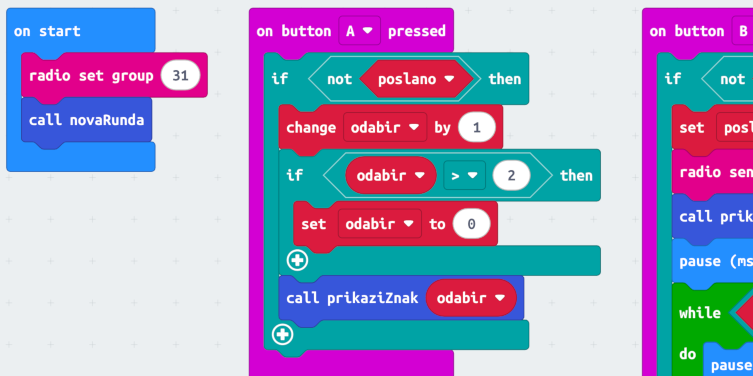
For waiting we use the while block from the Loops category. It repeats the blocks inside it for as long as the condition is true. Here the micro:bit looks every tenth of a second to see whether your neighbour’s sign has arrived. As soon as it arrives, the repeating stops and the program carries on.
While it waits, the micro:bit still receives messages: the short pause inside the loop gives the on radio received block its chance to remember the opponent’s sign.
The one-second pause before the waiting makes sure your sign is on the screen for at least a second. If your neighbour’s sign has already arrived, the waiting ends straight away, but you still got to see your own sign.
The waiting condition has two parts, joined by the and block from the Logic category. The repeating goes on only while both parts are true:
- poslano – the round is still on;
- protivnik < 0 – your neighbour’s sign hasn’t arrived yet.
Why do we need the first part as well? If someone touches the logo while you’re waiting, the new round sets poslano to false. The waiting then ends, and the result of the old round isn’t shown.
Who won?
The function sudi (Croatian for “judge”) decides. It first sets the variable pobjeda (“win”) to false. Then for each of the three cases in the table it asks: is my sign this one and the opponent’s that one? That’s a condition inside a condition again. If one of the cases is true, pobjeda becomes true. At the end, the function shows a face.
Predict
- You send rock, and your neighbour sends paper. What will your micro:bit show at the end, and what will your neighbour’s show?
- You both send scissors. What do both micro:bits show?
- You touch the logo while your micro:bit is waiting for your neighbour’s sign. What happens?
Try it
Play a few rounds. If the micro:bit waits and nothing happens, check that you have both pressed B. If the result doesn’t match the rules, compare the function sudi with the table of wins.
Extra tasks
- Points. Every win scores a point. After the result, make the micro:bit show your points. Hint: add the point in the function sudi, where the happy face is shown.
- First to three. When you reach 3 points, make the micro:bit show a big heart and play a tune, and the points start again from 0.
Exercise 3: Hot potato for nine players
Technique: a message with an address and a value
Now the whole group plays. The potato is hot and nobody wants to hold it!
- Everyone is in the same radio group, 50.
- Each player gets their own number from the leader, from 1 to 9, on a sticker.
- The leader starts the game from their own micro:bit. It throws the first potato to a random player, and the potato will explode in 15 to 30 seconds. Exactly when, nobody knows.
- Whoever has the potato sees it on the screen. Button A throws it to a random player. Along with the potato, it sends how many seconds are left before it explodes.
- Everyone else sees on their screen the number of the player who has the potato.
- When the time runs out, the potato explodes in the hands of whoever is holding it. Their screen shows a skull, and everyone else sees BUM.
A message with an address
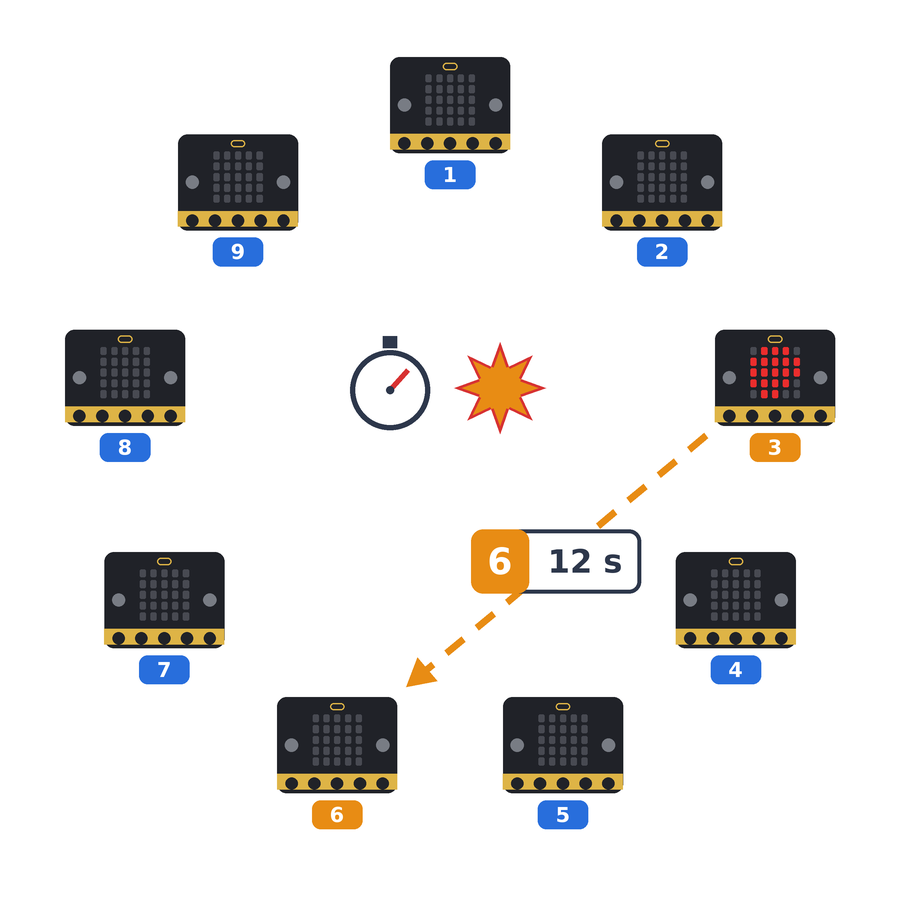
Everyone is in the same radio group, so every thrown potato is heard by all the players. So how does the potato reach only one?
The answer is an address, as on a letter. The thrower doesn’t send “here’s the potato”, but the number of the player they’re throwing it to. When a micro:bit receives the message, it checks: is that my number? If it is, the potato is theirs. If not, it just shows that number, so everyone knows who has the potato.
But the potato also has to carry the time that’s left. So we send a message in two parts, with the radio send value block:
- the name of the message is the address: the number of the player we’re throwing to, turned into text with the convert to text block;
- the value is the number of seconds before the explosion.
In the picture, player 3 throws the potato to player 6, with 12 seconds left before it explodes. The message is received by the on radio received name value block.
The same block also reports the explosion. Then the name of the message is BUM (Croatian for “boom”), so everyone else sees BUM on their screen. The value is the number of the player the potato exploded with, but we don’t need to show it: everyone has already seen who had the potato.
When does the potato explode?
Remember the stopwatch from the steady-hand game: the running time (ms) block tells you how many milliseconds have passed since the program started. When the potato arrives, the micro:bit works out the deadline, the moment of the explosion on its own clock: rok = running time + seconds × 1000 (rok is Croatian for “deadline”). Then it keeps checking whether the clock has passed the deadline.
For example, the potato arrives with 12 seconds when your clock shows 40000 ms. The deadline is 40000 + 12 × 1000 = 52000 ms.
- If you don’t throw it by 52000 ms: BOOM!
- If you throw it when the clock shows 45000 ms, there are (52000 − 45000) / 1000 = 7 seconds left. You send those 7 seconds on.
Why don’t we send the deadline itself? Because every micro:bit has its own clock, which started when that micro:bit was switched on. 52000 ms on your clock isn’t the same moment as 52000 ms on your neighbour’s. The seconds that are left mean the same on every micro:bit.
Player numbers
There are two variables in the program that you have to set:
- mojBroj (Croatian for “my number”) – your number from the sticker;
- brojIgraca (“number of players”) – how many players are playing today. The potato is thrown to someone from 1 to brojIgraca.
Numbers without gaps!
If seven are playing today, the leader hands out the numbers 1 to 7, and everyone sets brojIgraca to 7.
Why? If brojIgraca were 9, the potato would sometimes fly to player 8 or 9, who isn't here today. Nobody would catch it, and the potato would disappear.
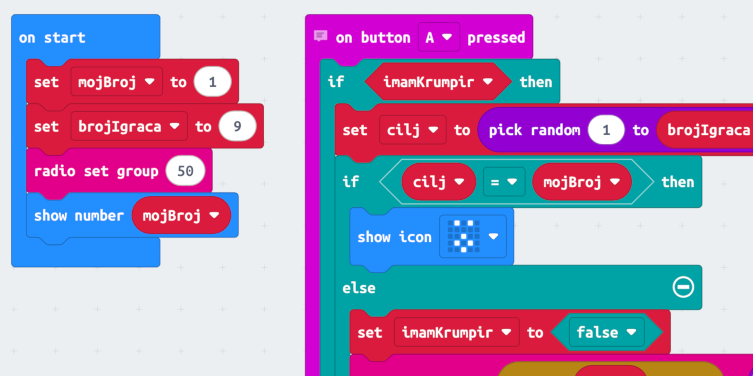
There’s no ready-made picture of a potato, so we drew one with the show leds block. The variable imamKrumpir (“I have the potato”) is true or false, like igraTraje in the steady-hand game, and cilj (“target”) is the number of the player you throw to.
The potato doesn’t fly to you. When the random number turns out to be your own, the micro:bit shows a surprised face, the potato stays with you, and you press A again. If it sent it, the potato would disappear, because a micro:bit doesn’t hear its own message.
How does the leader start the game?
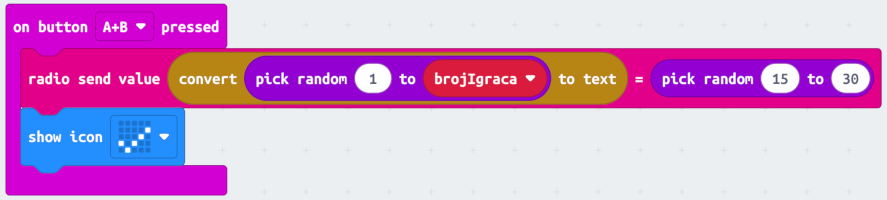
The leader’s micro:bit is in the same radio group, 50. When the leader presses A+B, it sends the same kind of message as a player throwing the potato: the name is a random player number from 1 to brojIgraca, and the value is a random number of seconds from 15 to 30. For your micro:bit it’s an ordinary throw, so your program doesn’t need anything special for the start of the game.
Predict
- The potato arrives with 20 seconds, and you throw it after 5 seconds. How many seconds do you send?
- Player 3 throws the potato to player 6. What happens on player 5’s micro:bit?
- What would happen if two players had the same number?
Try it
Enter your number and the number of players, download the program and wait for the leader to start the game. Play a few rounds.
If the potato never reaches you, check:
- that your radio group is 50;
- that mojBroj is the number on your sticker;
- that brojIgraca is the same as everyone else’s.
Change one thing
- Draw your own potato, or turn it into something else nobody wants to hold.
- Change the tone you hear when the potato arrives.
- Change the time before the explosion, for example to 10 to 20 seconds. What is the game like now?
Extra tasks
- Burns. Make a variable opekline (Croatian for “burns”) that counts how many times the potato exploded in your hands. Make button B show the number of burns.
- Tick-tock. While you hold the potato, make the micro:bit give a short beep every half second. Hint: in a new forever block, ask do I have the potato?
What if a message gets lost?
At the start we said: nobody reports that a message has arrived. Sometimes a message gets lost, for example when a micro:bit is too far away or when two messages are sent at the same moment.
Think about it together:
- What happens in hot potato if a thrown potato gets lost? (Nobody has it, so it doesn’t explode with anyone. The game stops, and the leader starts a new round.)
- What happens in rock, paper, scissors if your sign gets lost? (Your neighbour waits for ever. Touching the logo starts a new round.)
- How could we make it less likely that a message gets lost? (We can send it several times in a row.)
When we control robots, this will matter: a robot has to know what to do if it doesn’t hear a message.
 What did we learn?
- Radio sends messages through the air, without wires. A transmitter sends radio waves, and a receiver catches them with its antenna.
- The micro:bit can be both a transmitter and a receiver. It works at 2.4 GHz, like Wi-Fi and Bluetooth.
- Every micro:bit nearby hears a message, but only the ones in the same radio group react to it.
- A micro:bit doesn’t hear its own message.
- Over radio we can send a number, a short text, or a name and a number together. We use a number for a choice, and text for a command.
- Both micro:bits have to know in advance what each message means.
- When everyone hears a message, its name can be an address: only the player with that number takes the potato, and the others see who it was thrown to. The number in the same message carries a value, for example the seconds that are left.
- Every micro:bit has its own clock. That’s why we send how much time is left, not a moment on our own clock.
- A program can remember a message and show it only when the time is right.
- The while block repeats blocks for as long as a condition is true. The micro:bit uses it to wait for a message.
- The and block joins two conditions: the whole condition is true only if both are true.
- Nobody reports that a message has arrived, so a message can get lost.