Pinball
We build a tabletop pinball machine with Arduino together: buttons, ball sensors, coils, lamps, an LED display and sound, part by part in the workshops.
Introduction
Pinball is a game in which a metal ball rolls down a sloping table and the player hits it back towards the top with two flippers. On the way the ball bounces off bumpers, hits targets and runs through lanes, and every hit scores points. Lamps flash, the speaker plays sounds and the display shows the score. When the ball gets past the flippers and drops into the hole at the bottom, the player has lost that ball. A game usually lasts three balls.
This year we are building our own pinball machine in the Arduino workshops. It will be smaller than the ones in arcades: the playfield is about 30 × 55 cm and the steel ball is 15 mm across. We will make and program everything in it ourselves, part by part: buttons, sensors that detect the ball, coils that kick the ball, lamps, an LED display and sound. Every workshop from chapter 3 on teaches something the pinball machine needs.
A little pinball history
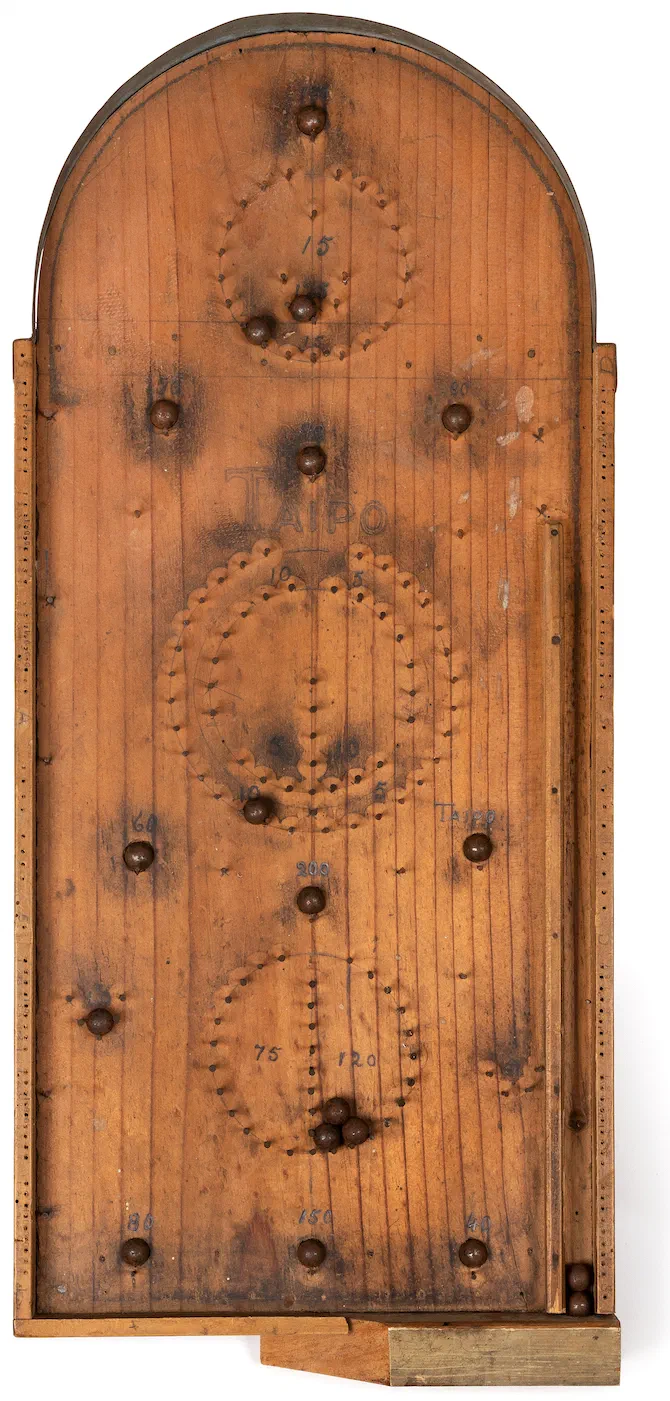
Pinball comes from bagatelle, a table game from 18th-century France. Players pushed balls with a cue across a sloping table full of pins, which is why the game is still called pinball in English.
In 1871 Montague Redgrave patented a bagatelle in the USA with a spring and a plunger that launches the ball. The bagatelle in the picture has a plunger like that (at the bottom right), and most pinball machines today still have a launcher that works the same way.
Bagatelle from the 1940s, Te Manawa Museums Trust. Photograph: Jess O'Brien, Te Manawa Museum Society (source), CC BY-NC 4.0, cropped.
The first coin-operated machines appeared in the early 1930s (Baffle Ball, 1931). They had no flippers yet: the player launched the ball and watched where it would land. Some players shook and lifted the machine to help the ball along, so in the mid-1930s the tilt was invented, a switch that then ends the game.
The first machine with flippers was Humpty Dumpty from 1947: six small flippers, three on each side. The very next year a machine with two flippers at the bottom of the playfield appeared, as on machines today. In Croatian the game is called fliper, after the flippers.
In New York pinball was banned from 1942 to 1976, because it was seen as gambling. Roger Sharpe helped to lift the ban: in front of the city councillors he announced which lane he would hit with the ball, and then hit it. That convinced them that pinball is a game of skill.
How a pinball machine works
The playfield is not level. It slopes towards the player, on our machine by about 6.5°, so gravity keeps pulling the ball down. Everything else in the game works against that:
- The launcher pushes the ball up the shooter lane to the top of the playfield.
- The flippers send the ball back up. The player works them with the buttons on the sides of the machine.
- Bumpers and slingshots kick the ball by themselves as soon as it touches them, so it flies off in an unexpected direction.
- Targets, rollover lanes and sensors report where the ball has been, and the program awards points for it.
- Lamps, the display and the speakers show the player what is happening and what to hit next.
- The tilt makes sure the player doesn’t shake the machine too much: after two warnings the game takes the ball.
That makes a pinball machine a good example of a device with inputs and outputs, like the ones we have already met in the workshops. The inputs are the buttons and the sensors that detect the ball. The program on the Arduino decides what to do with them, and the outputs are the coils (solenoids) that move the flippers, slingshots and bumpers, then the lamps, the display and the sound.
Four Arduino Unos share the work: two drive the coils, one runs the game and keeps the score, and one controls the display, the lamps and the sound. That way the flippers always react to the buttons straight away, even when the game program is busy with something else. We have already seen how two Arduinos talk to each other in two traffic lights at a crossroads. Why four boards, and what the other options are, is explained under Which Arduino?
The coils come later
The pinball coils run on 12 V, draw a lot of current and can get hot. We only connect them in chapter 5, once we have learnt how to power and protect them safely, and always with the workshop leader.
The starting idea
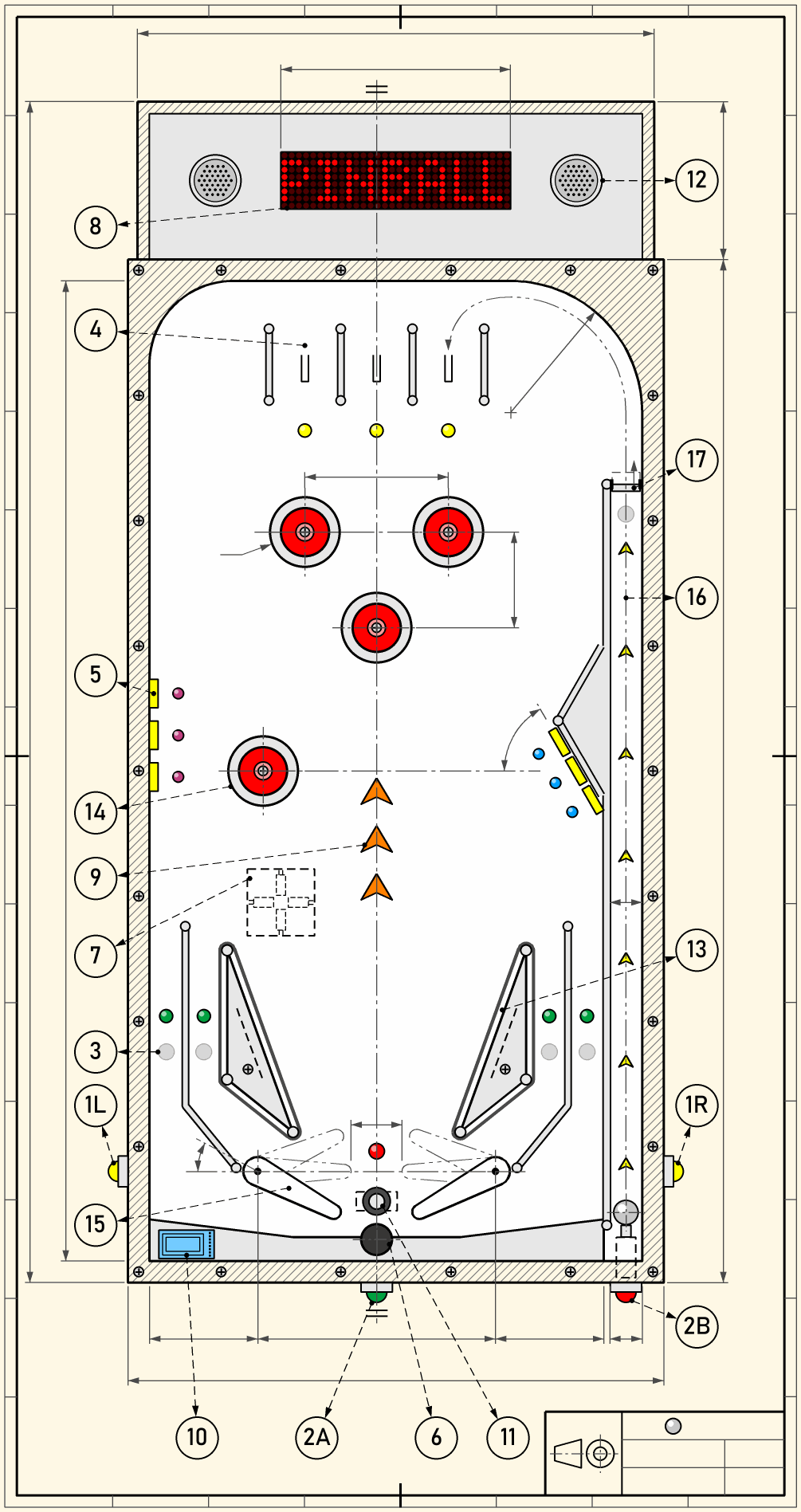
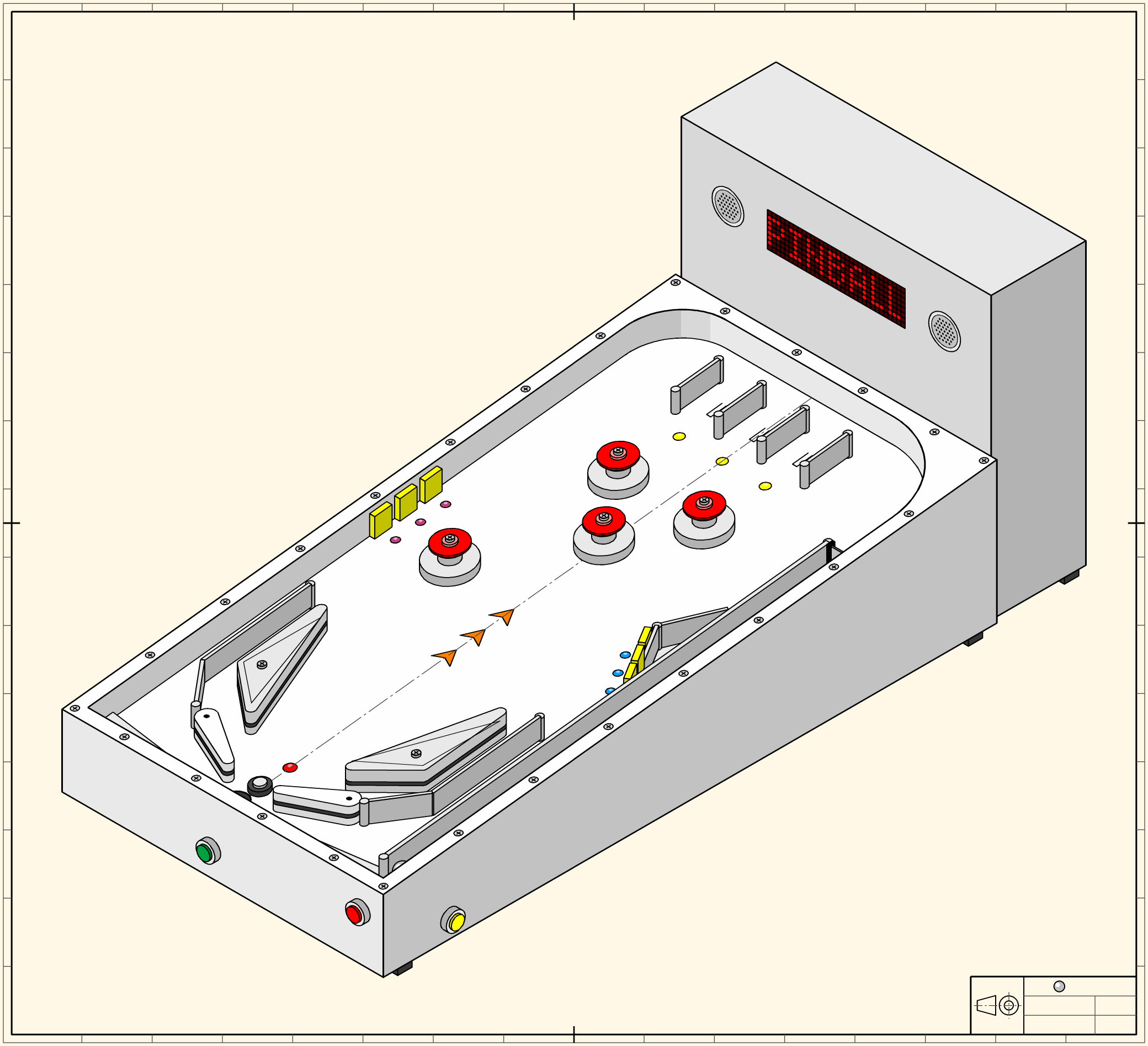
To start with, we drew the pinball machine as a technical drawing from three directions: the top view (on the right), the side view and the front view. The dimension lines are only there for the look, so they have no numbers on them. At the top of the page the same machine is drawn as an isometric view, as if we were looking at it from the front right and from above.
The drawing is a starting idea, not a finished plan. While we build a cardboard prototype, try out a flipper on a test bench and lay out the playfield at full size, a lot of it will change, and we will change the drawing along with the machine.
Legend
The numbers on the drawing follow the order in which we meet the parts in the workshops. Each part lists the workshop where we work on it. The links go to the workshops that are already published, and we will add the others when they are.
- 1L, 1R – flipper buttons, left and right, move the flippers. Workshop 3.0: Buttons done right.
- 2A – start button starts the game. A short press and holding the button can mean different things. Workshop 3.0: Buttons done right.
- 2B – launch button sends the ball into play. Workshop 3.0: Buttons done right.
- 3 – ball sensor reports that the ball has gone past: the ball presses a small plate, and the plate presses a microswitch under the playfield. On the drawing there are sensors in the four lanes beside the flippers and at the top of the shooter lane. Workshop 3.2: Detecting the ball. The Arduino reads a microswitch just like a button, which we covered in workshop 3.0: Buttons done right.
- 4 – rollover lane: a lane at the top of the playfield with a switch that the ball presses as it rolls through. Workshop 3.2: Detecting the ball.
- 5 – target: a small plate the ball hits, with a microswitch behind it. There are many of them on the playfield, so the Arduino reads them through a switch matrix. Workshops 3.2 and 3.3: Detecting the ball and Many switches on few pins.
- 6 – drain hole: where the ball leaves the game; a sensor in it reports that the ball is lost. Workshop 3.2: Detecting the ball.
- 7 – tilt: four small ball tilt switches on the cabinet floor, lying almost flat and facing four ways, like a compass. When the player shoves or lifts the machine too hard, the ball in one of them rolls away and the switch opens. After two warnings the player loses the ball. The tilt is under the playfield, so it is dashed on the drawing. Workshop 3.2: Detecting the ball.
- 8 – display of four 8×8 LED matrices shows the score, messages and animations. Workshops 4.0 and 4.1. You can already draw pictures for a matrix in the character generator.
- 9 – lamps on the playfield show the player what to hit. Workshop 4.1. We already switched LEDs on one after another in the traffic lights for cars and pedestrians.
- 10 – RFID reader under the apron at the bottom of the playfield recognises the player’s card. Workshop 4.2. We met the voltage divider it needs in workshop 2.1: Voltage divider, Arduino and PWM.
- 11 – post between the flippers: a servo raises it to save the ball. Workshop 4.3.
- 12 – speakers play sound effects and music. Workshops 3.1 and 4.4.
- 13 – slingshot: a triangle with a rubber band. When the ball hits the rubber, it presses a microswitch behind it, and a coil kicks the ball away. Workshop 5.2. We met the transistor as a switch in workshop 2.0: Arduino - step by step.
- 14 – pop bumper kicks the ball as soon as the ball touches it: the ball presses a microswitch under the bumper, and a coil kicks the ball away. Workshop 5.2.
- 15 – flipper sends the ball back up, moved by a coil. Workshop 5.3: A flipper on a test bench.
- 16 – shooter lane: where the ball starts its way into the game. The lamps along the lane light up one after another towards the top, inviting the player to launch the ball. A coil drives the launcher. Workshop 5.2.
- 17 – one-way gate lets the ball out of the shooter lane onto the playfield, but not back. It is a mechanical part that we will make with the 3D printer.
The screws along the edge of the cabinet, on the bumpers and on the slingshots hold the clear cover that goes on the finished machine. That is why the screws have no number of their own.
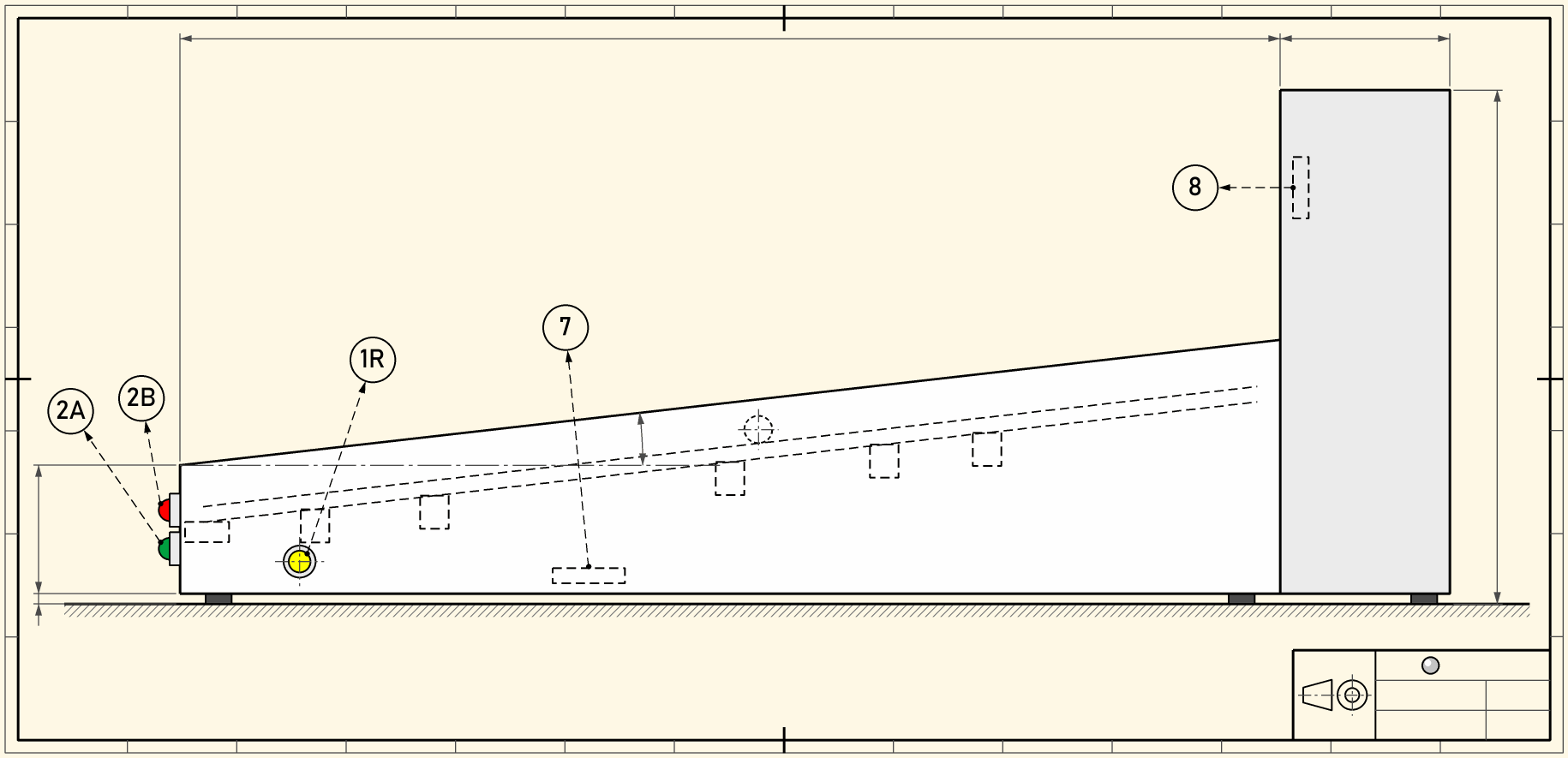
The side view shows the machine from the right, with the player standing on the left. You can see the slope of the playfield and the buttons on the front. The dashed lines are parts you can’t see from outside: the playfield, a ball on it, the coils under the playfield, the tilt on the cabinet floor and the display in the backbox.
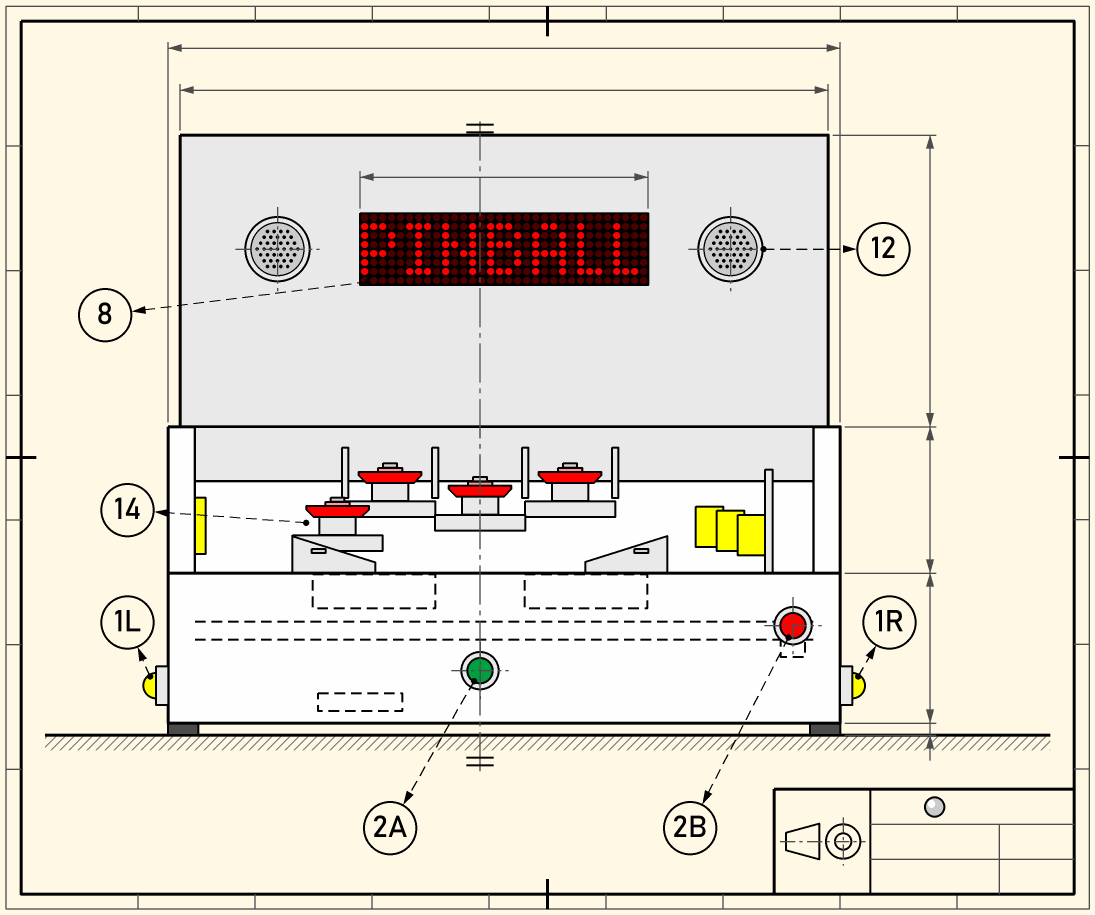
The front view shows the machine as the player sees it: the display and speakers on the backbox, the buttons on the front and sides, and above the front panel the parts of the playfield that stand high enough to be seen.
Building: heights and gaps
We will make most of the parts on the playfield ourselves and print them with the 3D printer: the bumpers, slingshots, flippers, guide rails and the low walls between the lanes. So we have to decide in advance how tall each part may be and how high above the playfield the clear cover sits. This is the plan as it stands, and we will check it on the prototype.
The ball and the cover
The ball is steel and 15 mm across. It weighs about 14 g, seven times as much as the 8 mm ball we first planned, so it presses a microswitch more easily.
The ball may bounce around and hit the cover, because that makes the game more fun. But it must not jump over a guide rail or another obstacle and land where it shouldn’t. For that there is one rule:
The gap between the top of an obstacle and the cover is at most half the ball’s diameter.
Then the middle of the ball can never rise above the top of the obstacle, so the ball can only hit the obstacle from the side and bounce back. If the gap were only a little smaller than the ball, the ball couldn’t get over the obstacle, but it could jump onto its edge. There it would get stuck between the edge and the cover, or roll along the top of the rail like a train on a track.
That is why we leave 5 mm above every fixed obstacle. That is less than half the ball (7.5 mm), and it leaves about 2 mm in case the plywood warps a little or the cover bends a little between its supports.
The bumper decides the height of the cover
The bumper is the tallest part on the playfield, so it decides how high the cover sits. A bumper has three parts:
- The skirt at the bottom: the ball hits it, the skirt tips and presses a microswitch under the playfield.
- The ring above the skirt: a coil pulls it down, and it pushes the ball away.
- The body in the middle: it is fixed to the playfield, the ring slides on it, and its top holds up the cover.
The ring has to push the ball sideways, not press it into the playfield. The ring always pushes the ball towards its middle. If it touches the ball near the top, it pushes it mostly down and the ball stays where it is. If it touches it about halfway between the middle and the top (at 45°), it pushes it sideways and down equally, and the ball flies off.
That is why the bottom outer edge of the ring has a 45° chamfer, 3–4 mm wide. The sloping face always pushes at the same angle, even when the ball isn’t in exactly the right place. The ring is 2–3 mm wider than the skirt, so the chamfer comes above the upper outer part of a ball that touches the skirt.
| Part of the bumper | Height above the playfield |
|---|---|
| Edge of the skirt, where the ball hits (height of the ball’s middle) | 7.5 mm |
| Bottom of the ring when pulled down (just above the ball’s middle) | 9 mm |
| Bottom of the ring at rest (just above the top of the ball) | 16 mm |
| Ring with the chamfer | + 5 mm |
| Body above the ring | + 2 mm |
| Top of the bumper | 23 mm |
The cover rests on top of the bumpers, on a rubber washer about 1 mm thick, so it is about 24 mm above the playfield.
The ring moves about 7 mm. A coil pulls hardest near the end of its stroke, so we set it up so the ring uses the last 7 mm of the coil’s stroke, not the first.
Until the first printed bumper works, the cover sits on supports we can change. We decide the final height of the cover only once the bumper works properly.
Heights of the other parts
Fixed obstacles reach up to 5 mm below the cover. Moving parts need a little more room, so they don’t rub on the cover when it bends, but the gap above them is still smaller than the ball.
| Part | Height above the playfield (24 mm cover) |
|---|---|
| Guide rails, the shooter lane rail, the arch at the top of the playfield | 19 mm |
| Walls between the lanes (the rollover lanes and the lanes beside the flippers) | 19 mm |
| Slingshot bodies and the wall behind the slanted targets | 19 mm |
| Holder of the one-way gate | 19 mm |
| Pivot of the gate (above the top of the ball) | at least 16 mm |
| Flipper | about 16 mm |
| Post between the flippers, raised | at least 16 mm |
| Rubber on the slingshots and flippers (around the height of the ball’s middle) | 6–9 mm |
The cover rests on the outer walls and on the screwed supports on the bumpers and slingshots, so those reach all the way up to it.
The flipper is taller than the ball, and that’s fine. Its rubber is at the height of the ball’s middle, and the taller flipper stops the ball from jumping over it into the drain. The servo has to raise the post 16 mm, which it can do if its lever is long enough.
Printing and assembly
- We print the guide rails and lane walls standing up, with walls 2–3 mm thick, so they need no supports. PETG takes the knocks of a steel ball better than PLA.
- We round off or chamfer the top edge of every rail. If the ball does reach the edge, it slides off instead of getting stuck.
- We fix the rails to the playfield with screws or glue. A rail that moves even a millimetre opens a gap where the ball gets stuck.
- We print the bumper ring upside down, with the chamfer facing up, so it needs no supports. We leave 0.3–0.5 mm of clearance between the ring and the body. First we print a short test ring, because every printer prints a little differently.
- Two steel rods through the playfield pull the ring (3 mm rod or M3 threaded rod), not printed ones. A printed rod bends, and the ring tilts and jams. Two rods keep it level.
- The cover rests on the bumper’s body, not on the ring, so the ring moves freely underneath it.
- The rubbers on the slingshots and flippers are bought O-rings, not printed ones: they bounce better and are cheap.
- The bumper’s skirt is also its switch. It has to tip far enough to press the microswitch even when the ball only just touches it, so we test it together with the other microswitches.
- The cover is acrylic, 3 mm thick. If we are going to lean on it, we take 4 mm acrylic or polycarbonate, which doesn’t crack but scratches more easily. We put it on the supports with a rubber washer and don’t overtighten the screws, because acrylic cracks around the holes.
Checking on the prototype
- We put the cover on its supports and slide a 7 mm drill bit between the cover and every fixed obstacle, all the way along. The drill bit must not fit through anywhere.
- We press the cover down in the middle and check that nothing touches the flippers.
- We hit the ball hard towards the slingshots and rails and watch whether it jumps over them.
Which Arduino?
In the workshops we use the Arduino Uno, and the first plan was for three Unos to run the pinball machine. Before deciding, we compared the Uno with three other boards: the Nano is really an Uno in a small package, the Mega has many more pins, and the Giga is much faster and has much more memory. It turned out that the number of pins isn’t the only thing that matters.
What we look at
- Number of pins: every button, switch, coil and module takes one or more pins. We keep pins D0 and D1 free for the Serial Monitor.
- Logic voltage: the Uno, Nano and Mega run on 5 V, like the MAX7219 and the MOSFETs that switch the coils. A board that runs on 3.3 V needs extra parts, and 5 V on one of its pins can destroy it.
- Memory: RAM holds the variables while the program runs (the Uno has only 2 KB), and EEPROM keeps data even when the power is off, for example the high scores.
- Serial ports: the DFPlayer talks to the Arduino over a serial connection. The Uno has only one serial port, and the Serial Monitor uses it, so the DFPlayer gets one made in software (SoftwareSerial).
- Timers: on the Uno the Servo library takes the timer that makes PWM on pins D9 and D10, and we need PWM for the flippers. That is why servos and flippers can’t be on the same Uno.
- 3.3 V for the RFID reader: the RC522 runs on 3.3 V, and some boards can’t supply enough of it.
- Connections: the coils shake the cabinet, so jumper wires slowly work loose.
- Price and stock: we have 15–16 Unos, and we would have to buy the other boards.
The boards side by side
| Uno R3 | Nano (classic) | Mega 2560 | Giga R1 WiFi | |
|---|---|---|---|---|
| Logic voltage | 5 V | 5 V | 5 V | 3.3 V, pins not 5 V tolerant |
| Pins for inputs and outputs (without D0 and D1) | 18 | 18 + A6 and A7, as inputs only | 68 | about 74 |
| RAM / EEPROM | 2 KB / 1 KB | 2 KB / 1 KB | 8 KB / 4 KB | 1 MB / none |
| Serial ports | 1 | 1 | 4 | 4 |
| Timer conflicts | Servo and PWM on D9 and D10 | same as the Uno | Servo only takes D44–D46 | none that matter |
| 3.3 V for the RC522 | 3.3V pin, enough | often too weak on clones (it comes from the USB chip) | 3.3V pin, enough | runs on 3.3 V |
| Wiring in the machine | jumper wires or a shield | plugs into headers soldered onto a board | jumper wires or a shield | jumper wires or a shield |
| Rough price (clone) | €5–8 | €3–5 | about €15 | €70–80 (no clones) |
| In stock | 15–16 | none | none | none |
The prices are from 2026 and change quickly.
Does the job fit on the board?
Each Arduino in the machine has its own job. We counted how many pins each job needs, following the drawing: we read the 15 sensors and targets on the playfield through a 4 × 4 switch matrix (8 pins), the RFID reader needs 5 pins, and the Arduino that drives the coils tells the game Arduino what happened over separate wires, as in the two traffic lights at a crossroads.
The bumpers on the drawing are active: each one has a coil that kicks the ball away. A bumper can also be passive: it only detects the ball, and its rubber bounces the ball back.
| Job | Pins | Uno | Nano | Mega | Giga |
|---|---|---|---|---|---|
| Coils without active bumpers: 5 coils, 12 V on/off, 5 inputs, 3 wires to the game Arduino | 14 | ✓ | ✓ | ✓ | ✓ (with MOSFETs for 3.3 V) |
| Coils with 4 active bumpers: 9 coils, 9 inputs, 4 wires | 23 | ✗ | ✗ | ✓ | ✓ |
| Game Arduino: matrix 8, Start, tilt, reader 5, I2C 2, wires 3 | 20 | only with tricks | ✓ (Start and tilt on A6 and A7) | ✓ | ✓ |
| Show: MAX7219 3, servos 3, DFPlayer 2, I2C 2 | 10 | ✓ | ✓ | ✓ | with a level shifter |
| Game and show on one board | 26–27 | ✗ | ✗ | ✓ | ✓ |
| Everything on one board | about 44 | ✗ | ✗ | ✓ | ✓ |
- Tricks on the Uno: we put the Start button and the tilt into the matrix and leave the reader’s RST pin unconnected. Even then not a single pin is left free.
- A6 and A7 on the Nano can only measure a voltage and have no built-in resistor to 5 V. With a 10 kΩ resistor to 5 V,
analogRead()reads them as switches. That way the game Arduino just fits on a Nano, but without a single pin to spare.
How many boards we need
| Choice | Boards | Active bumpers | Note |
|---|---|---|---|
| 3 Unos (the first plan) | 3 | no | The game Arduino barely has enough pins |
| 4 Unos | 4 | yes | Our choice: the coils are on two boards, which agree over wires how many of them may fire |
| 3 Nanos | 3 | no | Like the first plan, with a little more room for the game Arduino |
| Mega (coils) and 2 Nanos (game, show) | 3 | yes | All the coils on one board, but the Mega and the Nanos have to be bought |
| 2 Megas | 2 | yes | Game and show share one program |
| 1 Mega | 1 | yes | The flippers wait for the game program |
| 1 Giga | 1 | yes | 3.3 V, price, two cores |
Why not one big board
A Mega has enough pins for the whole machine. But the main reason for several boards isn’t the pins. It is that the flippers never wait for the game program, and that a mistake in the game program can’t leave a coil switched on. On one board, everything shares the same loop():
- A single
delay()in a score animation stops the flippers too. - Reading a card can wait for a while when there is no card.
- If the program gets stuck, the only things protecting the coils are the watchdog (a circuit that restarts a stuck microcontroller) and the switch that turns off the 12 V.
When the coils have their own board with a small and simple program, none of that happens. With several boards, each team also has its own program, and we can quickly swap a broken board.
Why not the Giga
- 3.3 V: the pins are not 5 V tolerant. A single wire with 5 V on the wrong pin destroys a board that costs €70–80.
- Extra parts: the MAX7219 needs at least 3.5 V on its data input, so it needs a level shifter, and the MOSFETs have to switch reliably at 3.3 V. For the same reasons there is no ESP32 in the machine either.
- Two cores: coils on one core and the game on the other is a good idea, but two cores that talk to each other are too hard to program for our workshops.
- No EEPROM, so the high scores need different code.
- Libraries: we would have to check that each one works on the Giga.
- Wi-Fi is something we don’t need: we don’t send the participants’ data anywhere.
The Nano: what’s good and what to watch
What’s good:
- Solid connections: a Nano plugs into headers soldered onto a circuit board or a perfboard. Jumper wires slowly work loose from the shaking of the coils, and a loose connection is a common fault. A Nano in headers is swapped in a minute. An Uno needs a shield for the same.
- The same program: the Nano has the same chip, the same libraries and the same timers as the Uno. In the workshops we keep using the Uno, and the programs run on the Nano without changes.
- Small and cheap: it fits under the playfield, and a few spares cost little.
What to watch:
- Bootloader: for many clones you have to choose
Processor: ATmega328P (Old Bootloader)in the Arduino IDE, otherwise the upload fails. It’s best to write that on a label on the board. - USB: clones usually have a CH340 USB chip, which needs a driver on some computers. Older ones have a fragile mini-USB socket, so it’s better to buy ones with USB-C.
- 3.3 V for the reader: on clones the 3.3V pin comes from the USB chip and is often too weak for the RC522. The reader needs its own 3.3 V regulator.
- Headers come unsoldered, so the workshop leader solders them, as with the RFID reader’s headers.
- The Nano Every has 6 KB of RAM and runs on 5 V, but it has a different chip and different timers, and not every library supports it. Nanos that run on 3.3 V (33 IoT, 33 BLE, ESP32, RP2040) are out for the same reasons as the Giga.
Our choice: four Unos
We have enough Unos, so four Unos run the pinball machine. The bumpers are active, and all the coils with their switches don’t fit on one Uno, so two boards share them:
| Uno | Job | Pins (of 18) |
|---|---|---|
| Flippers | Flipper and launch buttons, slingshot switches; 2 flippers, 2 slingshots and the launcher; 12 V on/off; 3 wires to the game Arduino and 2 to the bumpers | 16 |
| Bumpers | Switches and coils of the 4 bumpers; 1 wire to the game Arduino and 2 to the flippers | 11 |
| Game Arduino | Matrix 8 (15 sensors and Start), tilt, I2C 2, 5 wires to the other Unos | 16 |
| Show | MAX7219 3, servos 3, DFPlayer 2, I2C 2, card reader 5, 1 wire to the game Arduino | 16 |
- At most three coils at once. The bumpers switch on one coil at a time, and only while the flippers tell them over a wire that they may. While a bumper is firing, they say so over a second wire, and the flippers count it as one of the three coils. If both boards decide at the same moment, four coils can be on together for a moment, but we choose the 12 V supply with room to spare, so that doesn’t matter. We saw how two Arduinos agree over wires with the two traffic lights at a crossroads.
- The flippers watch the bumpers. The flipper board switches the 12 V for all the coils. If a bumper fires for too long, for example because its program got stuck, the flippers switch off the 12 V. When the flipper board resets, the 12 V goes off by itself.
- The card reader is on the show board, not on the game Arduino, because the game Arduino wouldn’t have a single pin to spare, even with all the tricks. The show board reads cards before the game, remembers who is playing and keeps the high scores in EEPROM, because it also shows them.
- Solid connections: in workshop 6.4 we design the coil-driver board as a shield that plugs onto the Uno. The same board serves the flippers and the bumpers. The game Arduino and the show get ready-made prototyping shields, and we solder the connectors onto them. That way there are no jumper wires in the machine for the shaking to work loose. The gap between pins D7 and D8 on the Uno is wider than between the other pins, so an ordinary perfboard doesn’t fit onto an Uno.
- The same Uno as in the workshops: we try every program on a breadboard first, and we swap a broken Uno for a spare.
Before we build it, we will try out a printed bumper on its solenoid. If it doesn’t kick the ball away reliably, the bumpers become passive: the bumper Uno goes, and three Unos run the machine. We will put together the list of all the inputs and outputs in workshop 6.3.
What comes next
In chapters 3, 4 and 5 we meet the parts of the pinball machine one by one. In chapter 6 we design the machine together: we build a cardboard prototype, lay out the playfield at full size, write the rules of the game and split the work between four teams. In chapter 7 the teams build and program the machine, and we finish the year with a pinball tournament.